Welcome! You’re about to read about something new.
Most support teams face the same questions every day.
Answers exist, but they are scattered across documentation, old tickets, and internal notes. Managing them often requires a documentation plugin, a ticketing system, a chatbot, and separate subscriptions.
NiroHelp brings these functions together inside WordPress.
Its knowledge base, ticketing system, and AI support help your team handle recurring questions. AI answers from published documentation are provided when your confidence threshold is met. Otherwise, the ticket stays with your team.
AI should answer what your documentation supports and leave the rest to a person.
NiroHelp is available on WordPress.org. The free core help desk plugin includes unlimited agents and unlimited tickets.
What is NiroHelp?
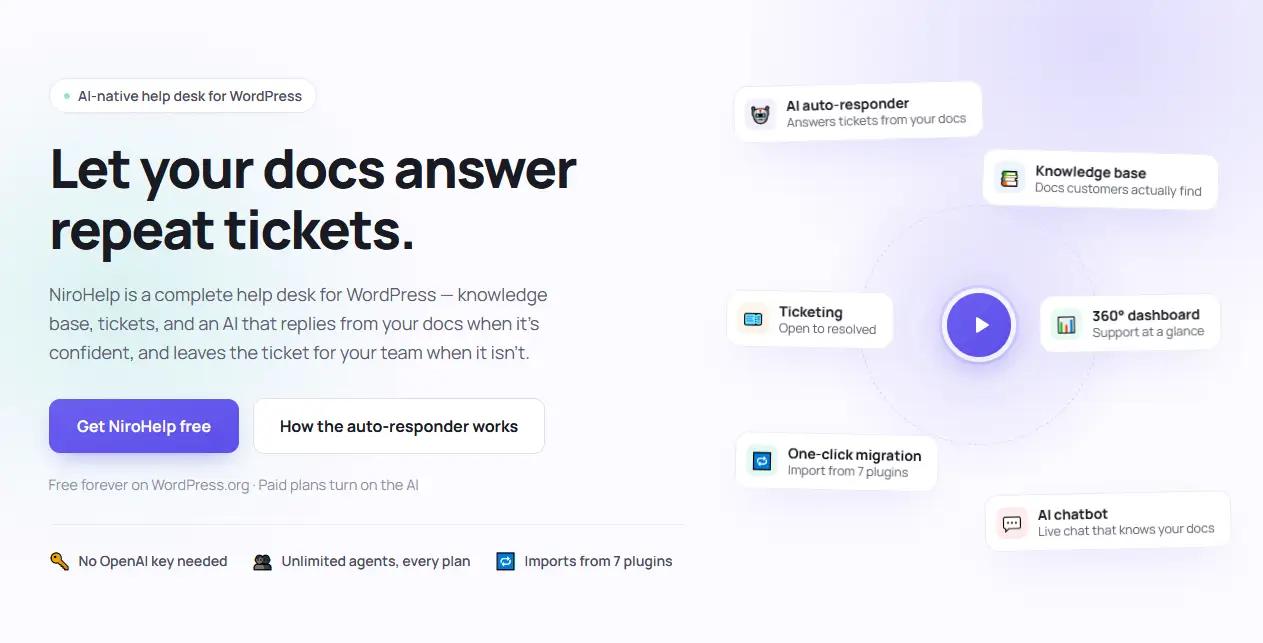
NiroHelp’s core tools cover documentation and ticket management for free. Paid plans add AI support and email piping.
Here’s what each feature does and where it’s included.
| Capability | What It Does |
| Knowledge base | Publishes searchable product documentation |
| Ticketing | Manages customer requests through a structured workflow |
| Support dashboard | Highlights overdue tickets, customer sentiment, and support activity |
| Migration tools | Imports documentation and tickets from supported plugins |
| AI chatbot | Answers website visitors using published documentation |
| Ticket auto-responder | Responds to suitable tickets when confidence is high enough |
| Support copilot | Answers questions about your support data |
| Email piping (coming soon) | Converts support emails into a trackable ticket |
You can enable or disable each module independently. You can use NiroHelp only for documentation, run documentation and tickets together, or connect the AI after your knowledge base is ready.
That flexibility matters because AI should not be the first step in a support setup. Reliable documentation should be.
Why We Built NiroHelp?
“Why build another support plugin?” It’s a fair question in a market full of options.

For us, the answer came from the people still struggling with the same issues every day. Questions kept repeating, conversations kept getting scattered, and managing support kept taking time away from helping customers.
For many teams, those problems start with a shared inbox. It works when requests are few, but as the queue grows, tracking who handles each conversation gets harder.
Two agents reply to the same customer. An urgent issue gets buried under routine emails. A returning customer has to explain a problem your team has already investigated.
Teams often add more tools to stay organized. But separate systems for documentation, tickets, and AI can create more places to search and more subscriptions to manage.
We built NiroHelp to bring these parts of support together inside WordPress. Your documentation, tickets, and replies stay on your website, so your team can find the information it needs and focus on helping customers.
Who Is NiroHelp For?
NiroHelp is designed for teams whose customers regularly need product guidance or technical support:
- Plugin and theme companies handling installation, licensing, and compatibility questions.
- WooCommerce businesses managing product questions and customer requests.
- WordPress agencies supporting clients and their websites.
- Small support teams that need clear ownership and workflows beyond a shared inbox.
How NiroHelp Decides When AI Should Respond
A fast answer is useful only if it helps resolve the problem. In customer support, an incorrect answer can create extra work for both the customer and the agent who follows up.
NiroHelp uses a controlled process for automatic ticket replies:
- Search the published knowledge base.
- Evaluate whether the documentation contains enough relevant information.
- Compare the result with your confidence threshold.
- Respond if the answer clears that threshold.
- Leave the ticket for your team if confidence is too low.
This gives your team control over how selective the AI should be. It also gives you a clear place to improve answers: the documentation behind them.
Your Documentation Is the Source
NiroHelp answers from your published knowledge base. It is not designed to search the open internet or invent product policies from general model knowledge.
If a licensing policy changes, update the relevant article. If a release changes the setup process, revise the installation guide. Once the knowledge base syncs, future AI answers can use the updated information.
The same articles serve customers searching for help and the AI answering questions. Your team maintains one approved source instead of correcting different versions across several tools.
You Control the Confidence Threshold
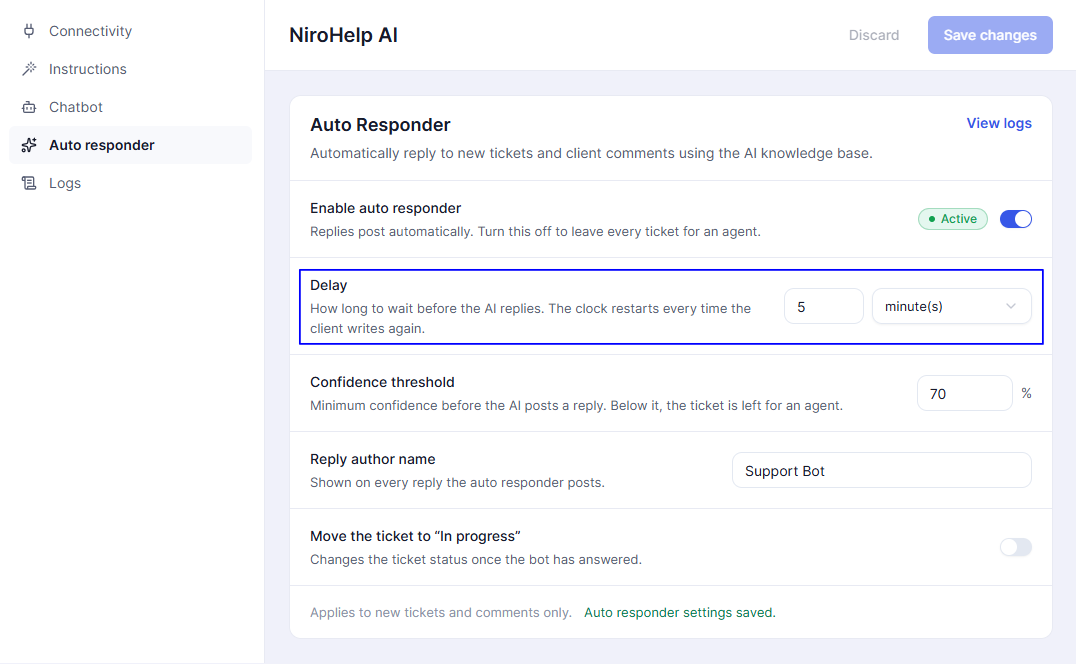
The confidence threshold determines how much evidence the AI needs before responding. For example, a higher threshold you can set as 80%.
| Setting | Expected Effect | When to Consider It |
| Higher threshold | Fewer automatic answers and more tickets for agents | Documentation is still developing or incorrect answers carry greater consequences |
| Balanced threshold | Moderate automation with human fallback | Documentation covers most recurring questions |
| Lower threshold | More automatic answers, with greater risk of incomplete responses | Questions are straightforward, and documentation is comprehensive |
These describe the tradeoff, not a guarantee of accuracy. Review actual answers before deciding which setting works for your team.
You can also add standing instructions for tone, terminology, and response style, helping the AI use language your customers recognize.
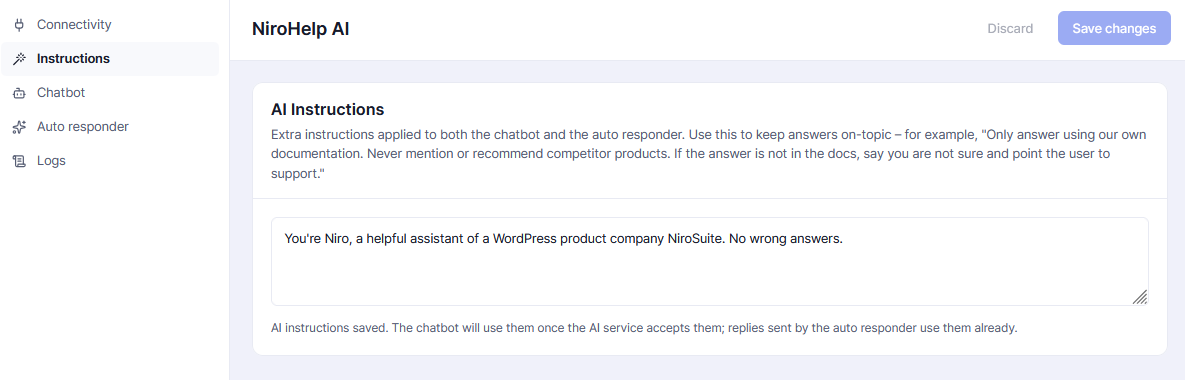
Human Agents Keep Control
When confidence is too low, the ticket auto-responder stays quiet. The customer is already asking support for help, so another message telling them to contact support would add little value.
The AI also stops responding when an agent joins the ticket. A configurable delay gives customers time to finish explaining their issue before an automatic reply appears. The default is five minutes, with no more than one AI response per customer message.
Move Existing Support Content Into NiroHelp
NiroHelp can migrate content from seven WordPress documentation and support plugins:
- BetterDocs
- weDocs
- Echo Knowledge Base
- BasePress
- Awesome Support
- SupportCandy
- JS Help Desk
(And more coming soon)
Depending on the source plugin, the migration can include articles, categories, tickets, replies, and attachments.
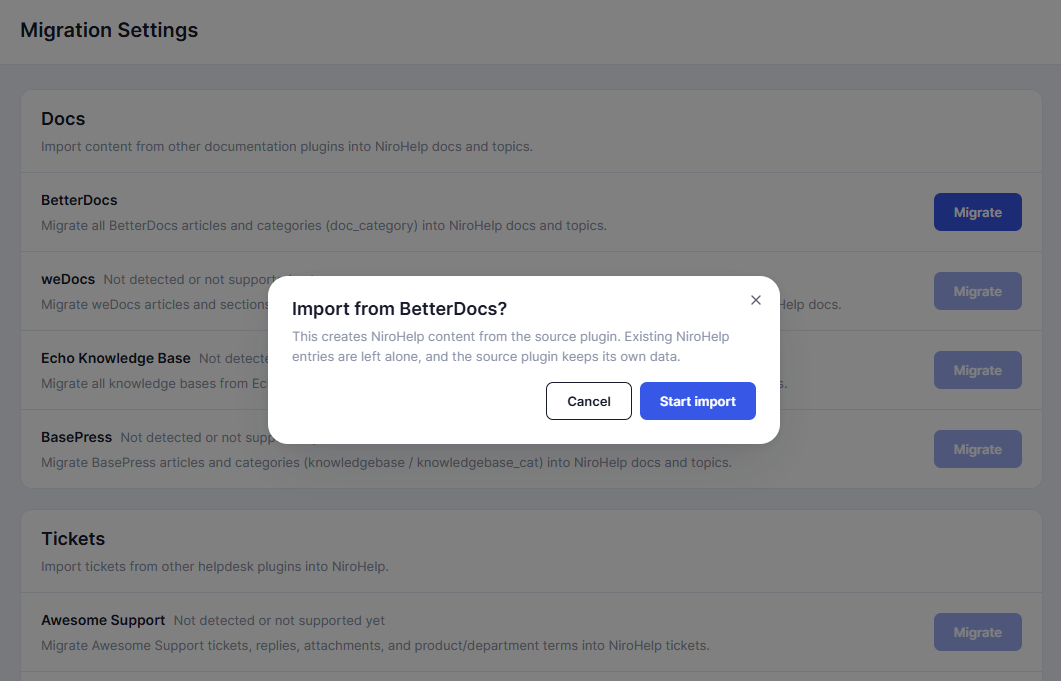
The importer does not modify the original plugin’s data. Imported records are marked, and running the migration again does not create duplicates. This means you can test the import, inspect the result, and repeat it later without damaging the original support setup.
Build Documentation Customers Can Actually Navigate
NiroHelp knowledge base articles use the WordPress editor. Your team can publish instructions using the same workflow it already knows, including:
- Headings and formatted text
- Images and screenshots
- Links
- Code blocks
- Product associations
- Topic-based organization
- Anchor links for specific sections
Product associations are especially useful for companies supporting several plugins, themes, or services from one website. Instead of placing every article inside one large documentation archive, you can connect each guide to the relevant product.
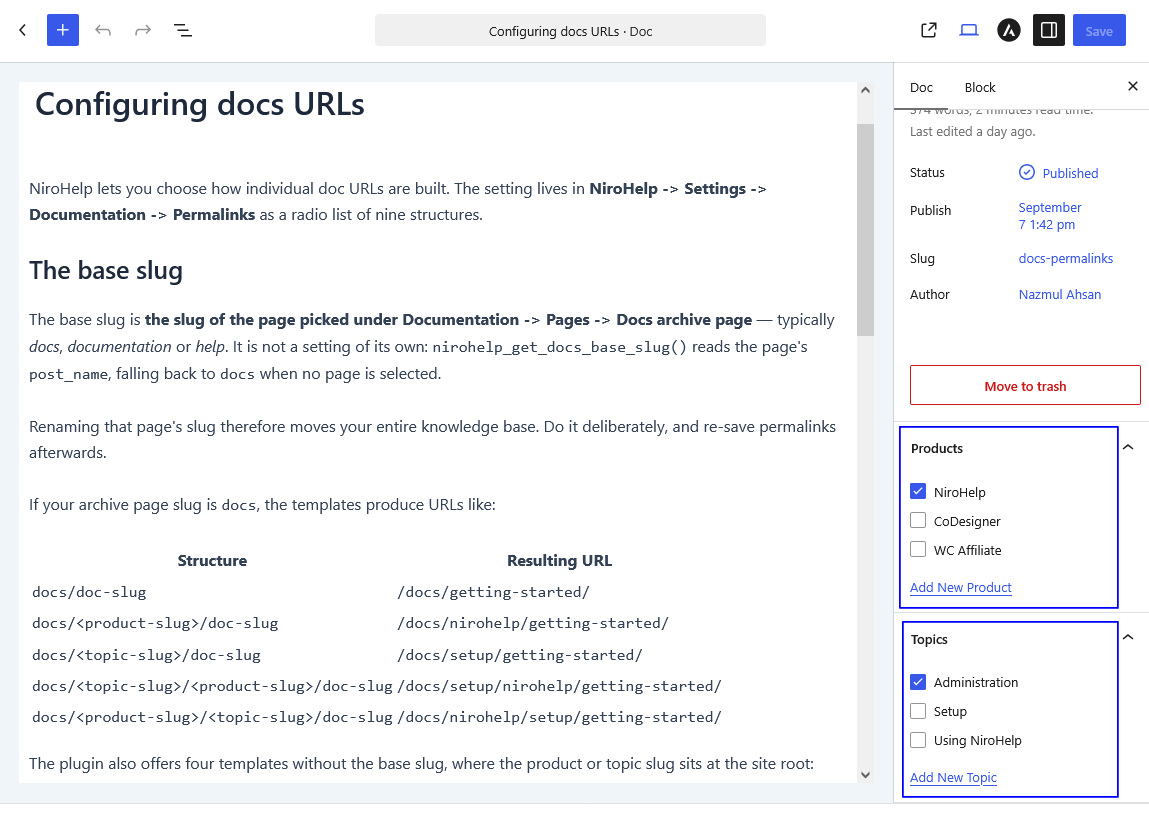
Customers receive instant front-end search and can mark an article as helpful or unhelpful.
That feedback is more useful than a raw page-view count. A heavily visited article may appear successful while still failing to answer the question that brought people there. Repeated “not helpful” votes identify documentation that needs clearer steps, updated screenshots, or missing context.
Anchor links also let agents send customers directly to a specific instruction rather than asking them to search through a long article.
Create a Support Environment Agents and Clients Can Easily Use
Customers can submit tickets and follow up from the front end without entering wp-admin. With a magic link in their email, they can easily submit the ticket.
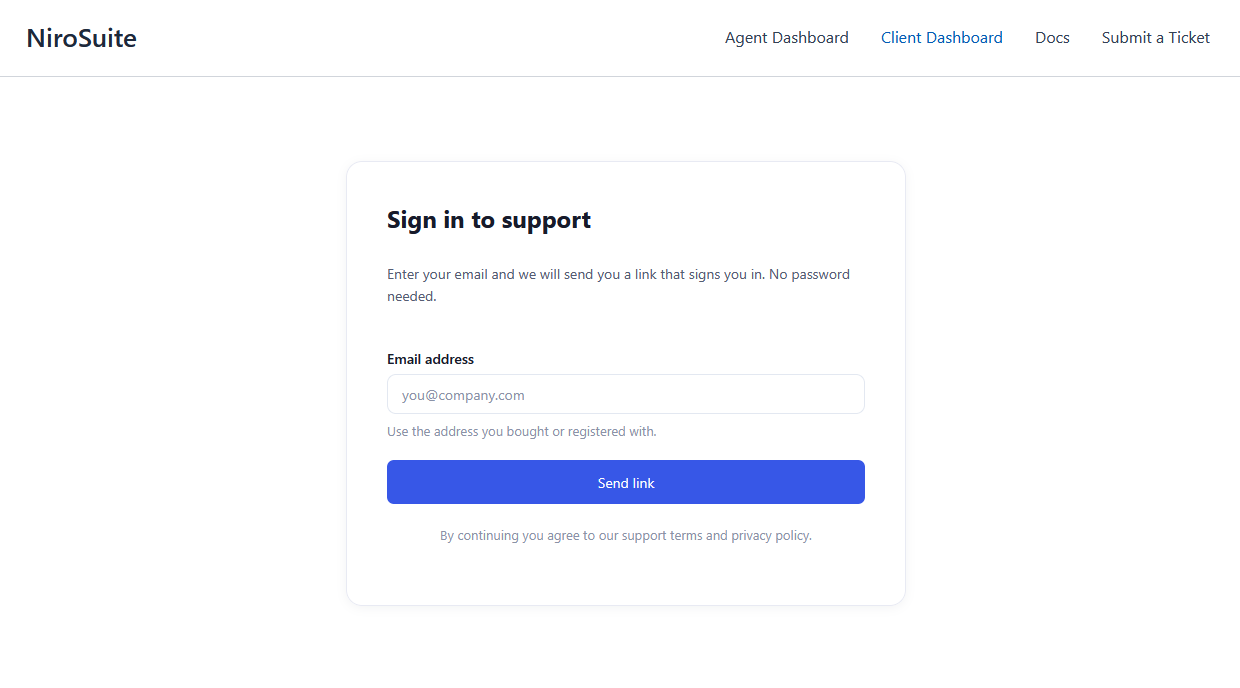
The submission form can be embedded on any page, allowing the support experience to remain part of your existing website.
Custom fields help you collect the information an agent needs before troubleshooting begins, such as:
- Order number
- License key
- Product name
- WordPress version
- PHP version
- Error message
- Hosting environment
Each ticket can include a reason, urgency level, assignee, and one of eight workflow stages.
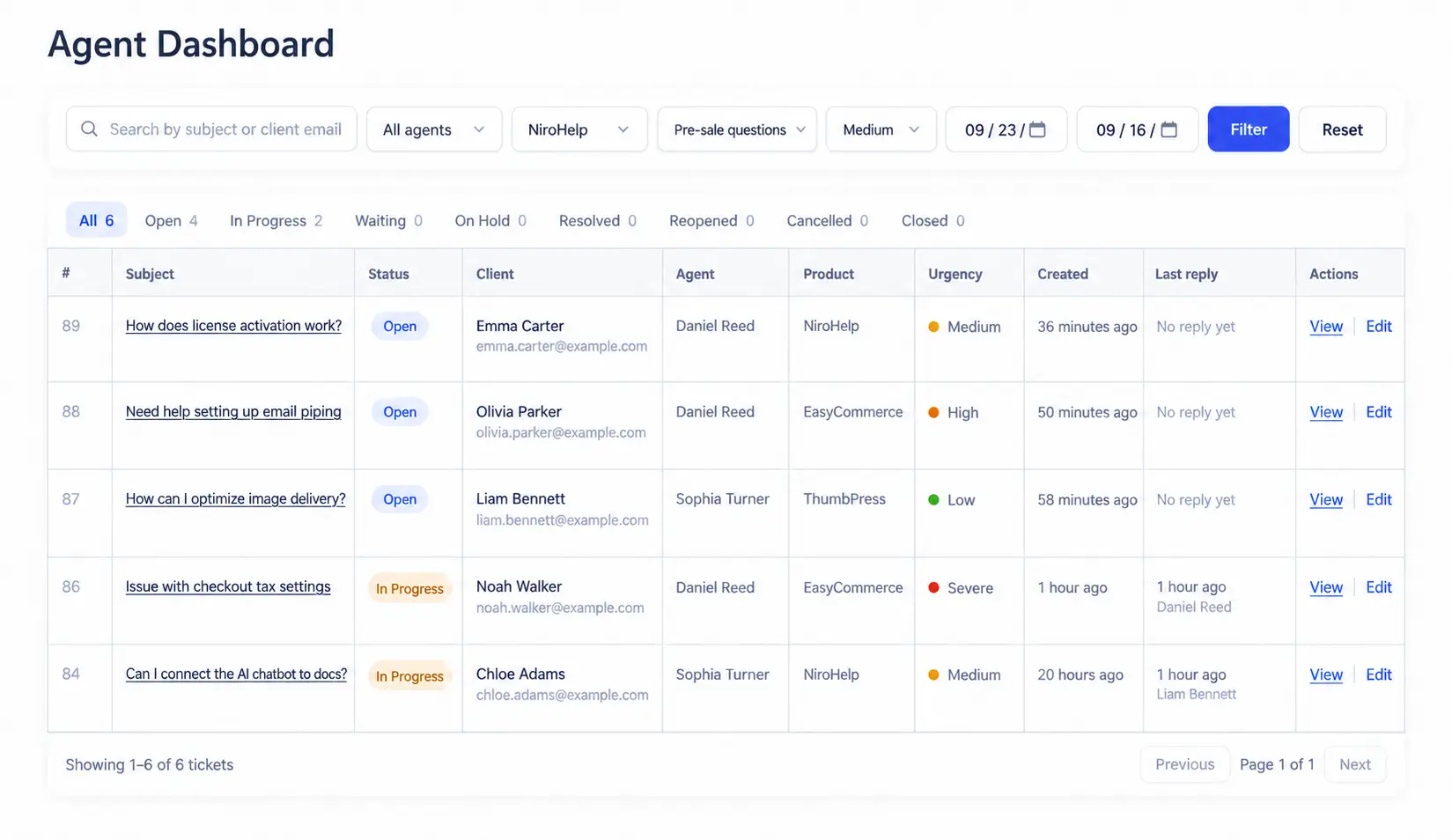
Automatic assignment distributes incoming tickets across the team. A per-agent limit prevents one person from receiving an unreasonable number of active conversations while other agents remain available.
Customers access their tickets through a dedicated client login. They do not need a standard WordPress account or access to the administration area.
Most importantly, adding another agent does not change the plan price.
Find the Tickets That Need Attention
A support dashboard should help the team decide what to do next. It should not turn ordinary ticket activity into decorative charts.
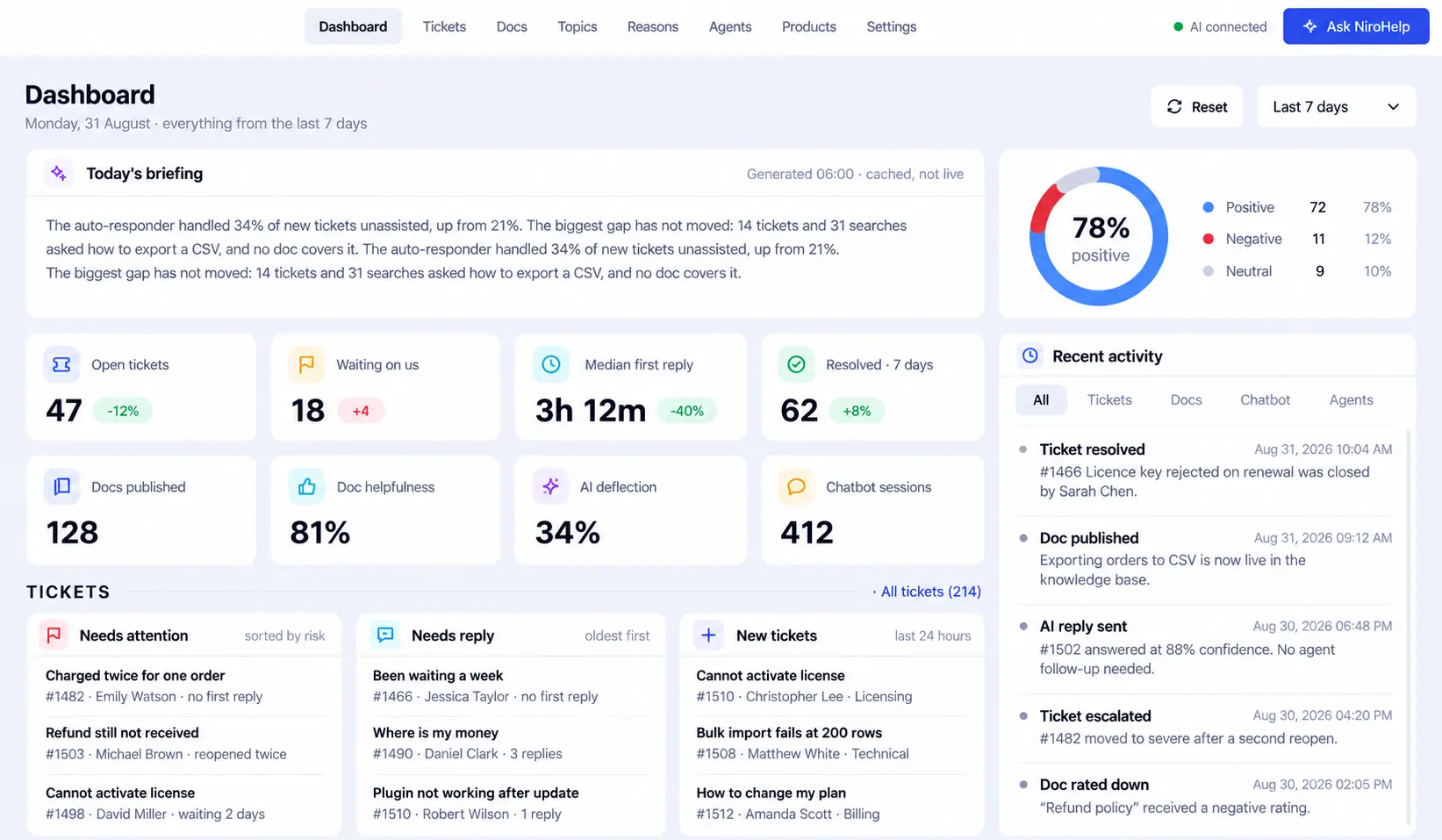
The NiroHelp dashboard focuses on operational questions:
- Which tickets are overdue?
- Which customers are becoming unhappy?
- Which conversations still need a human response?
- How many conversations did the AI handle?
- Where is the queue beginning to slow down?
The dashboard also helps you separate AI activity from actual support performance. A high automation rate is not automatically a good result. The useful question is whether customers received answers that resolved their problems.
What Paid Plans Add
Paid plans add four functions to the free help desk:
- AI chatbot
- Ticket auto-responder
- Support copilot
- Email piping (coming soon)
These features extend the existing workflow rather than replacing it. If the AI is disconnected or its monthly allowance runs out, your documentation, tickets, and support records continue working.
AI Chatbot – Answer Website Visitors With the AI Chatbot
A single script can add the NiroHelp chatbot to any WordPress or non-WordPress website(yes, you read it right).
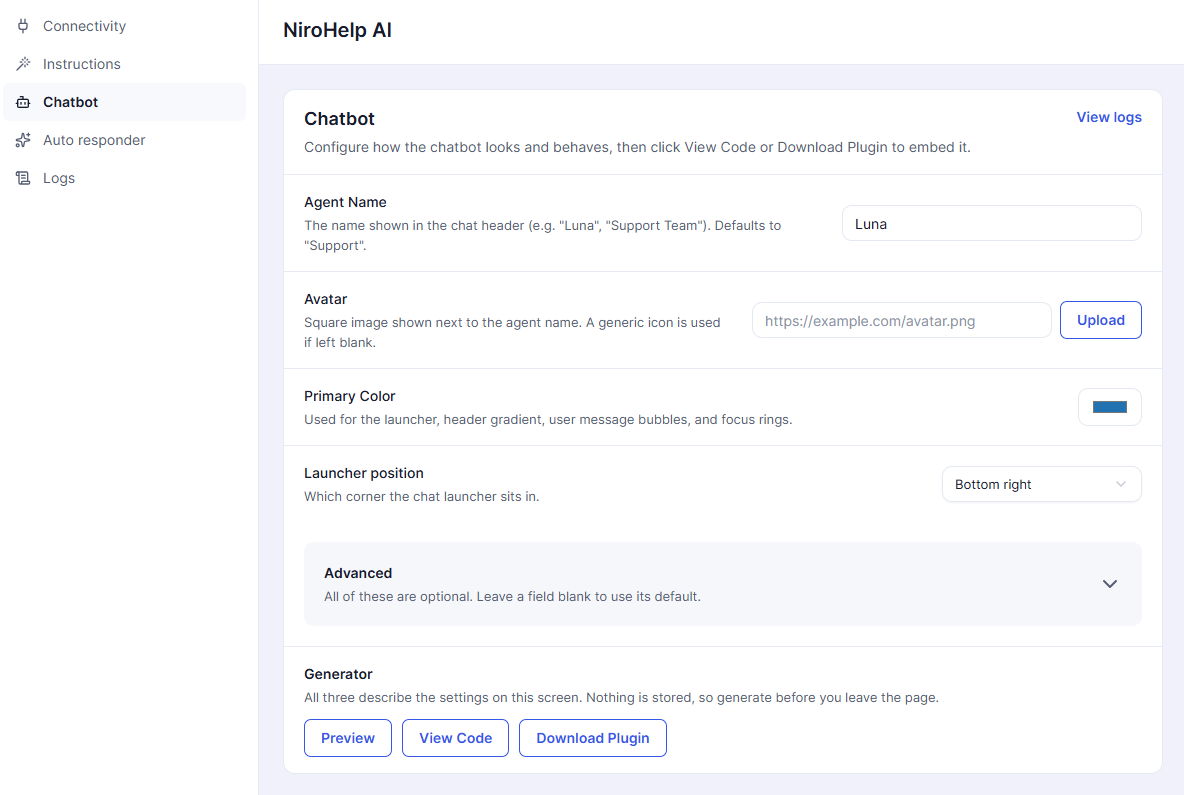
The chatbot
- Answers from your knowledge base
- Remembers the conversation as visitors change pages
- Recognizes configured business hours
- Uses your chosen name and avatar
- Matches your brand accent color
- Can be branded separately for agency clients
Because the chatbot relies on your documentation, it works best when articles answer specific customer questions rather than presenting only broad product descriptions.
A page titled “License Activation Failed” gives the AI stronger material than a general “Getting Started” page containing a few unrelated paragraphs.
Auto Responder – Respond Automatically to Suitable Tickets
The auto-responder applies the same confidence-based process to incoming tickets.
If the knowledge base contains a strong answer and the result clears your threshold, NiroHelp can respond. If the available information is incomplete, the ticket stays in the human queue.
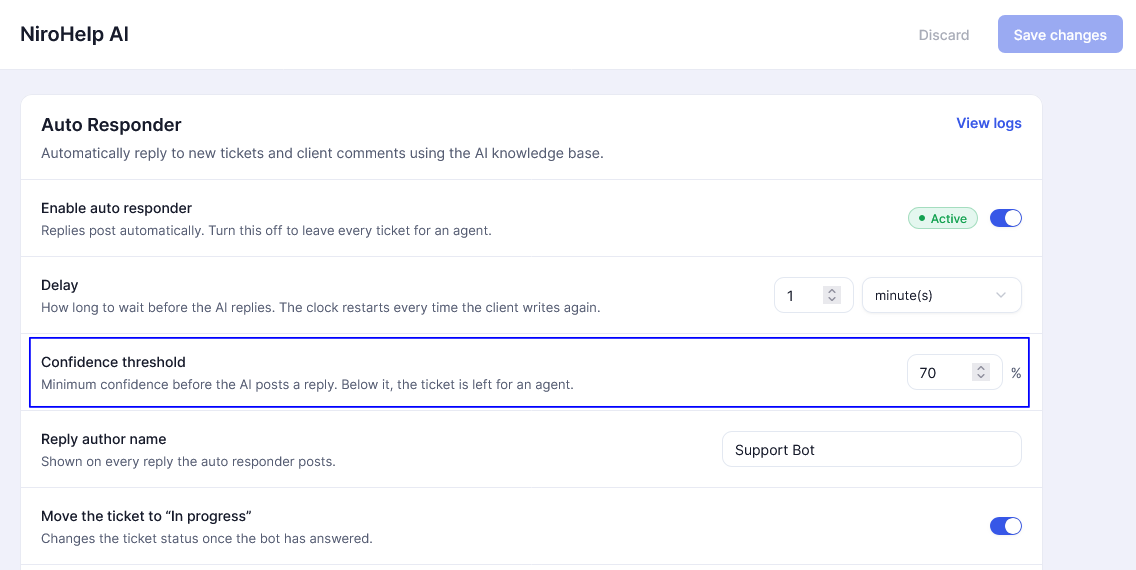
You can connect or disconnect the AI without affecting the ticket system. That lets you start conservatively, review results, and expand automation only where it performs reliably.
Email Piping- Convert Support Emails Into Tickets
Email piping converts messages sent to your existing support mailbox into structured tickets.
Customers continue writing to the address they already know. Your team gains:
- Ticket ownership
- Conversation history
- Workflow stages
- Internal visibility
- Reporting
- Consistent reply threading
Multiple support addresses can be connected, which is useful when a company maintains separate inboxes for billing, technical support, or individual products. This amazing feature is already in our NiroHelp roadmap. Once it is live, we will share it with everyone.
Support Copilot – Ask Questions About Your Support Operation
The NiroHelp copilot lets your team query support data using ordinary language.
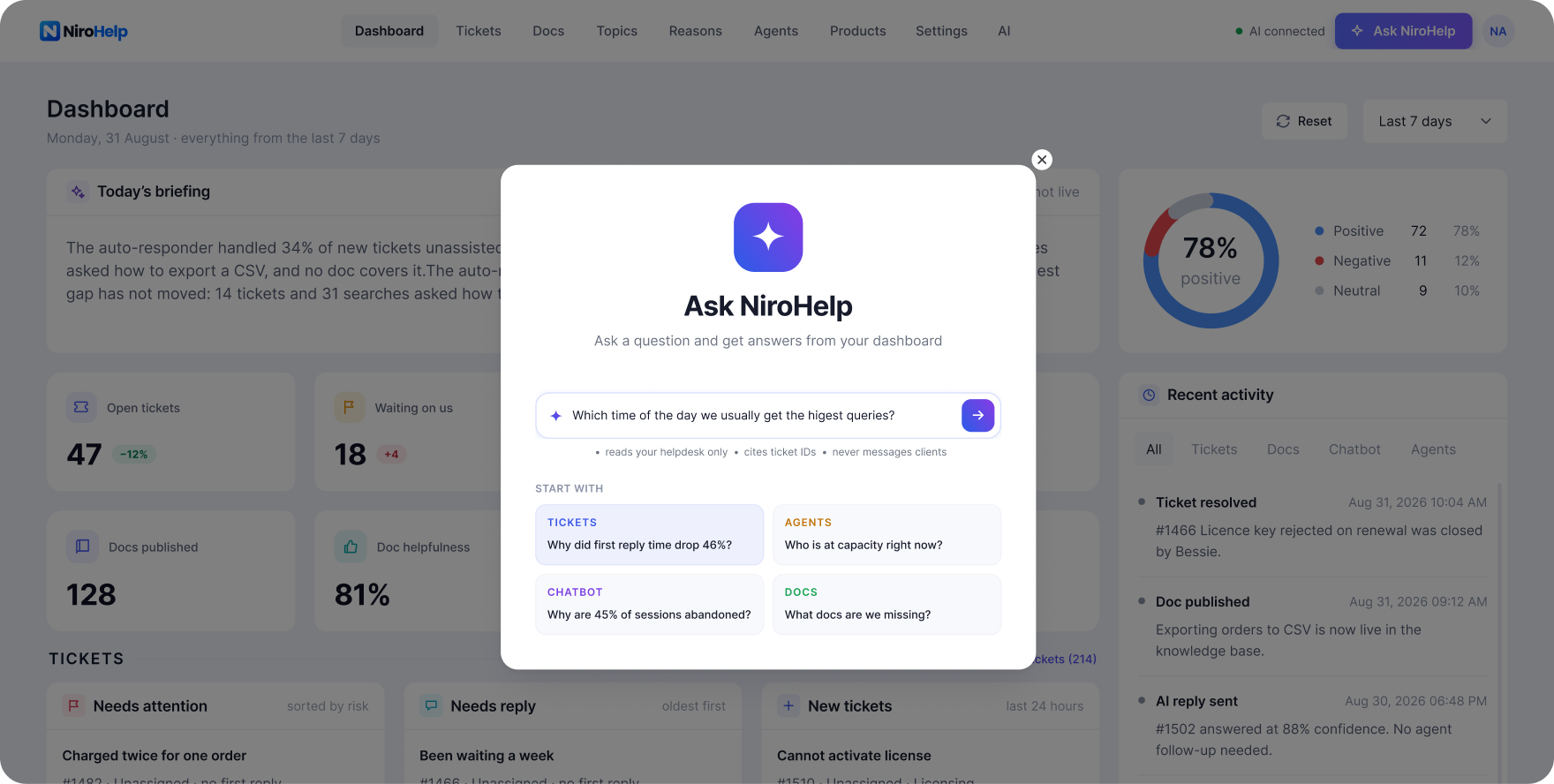
For example:
“Which customers have been waiting the longest?”
That question is often faster than selecting several filters, choosing a date range, sorting the results, and checking each ticket manually.
A report shows that 82% of customer experience leaders believe AI-powered analytics can uncover insights in seconds that previously took analysts much longer to find.
The practical benefit is not the chat-style interface itself. It is reducing the time between noticing a problem and finding the tickets behind it.
Where Your Support Data Lives
NiroHelp stores core support records in WordPress. AI answer generation uses an external service. These are separate parts of the system.
| Data or Function | Where It Operates |
| Knowledge base articles | Your WordPress database |
| Support tickets and replies | Your WordPress database |
| Customer records | Your WordPress installation |
| AI answer generation | NiroHelp’s external AI service |
| Email piping | Through your configured mailbox connection |
Documentation and tickets use WordPress posts, while ticket replies use comments. Your records remain on your hosting in familiar WordPress structures.
Disabling a module does not delete its content. Uninstalling NiroHelp also preserves articles, tickets, and customers, although accessing them through another interface may require additional work.
What Happens When You Enable AI?
NiroHelp sends the context needed to generate an answer to its external AI service. This includes relevant conversation and knowledge base information; automatic ticket replies involve the ticket being answered.
You do not need an OpenAI or Anthropic API key, a separate model-provider account, or another per-token invoice. Paid plans include a monthly AI credit allowance.
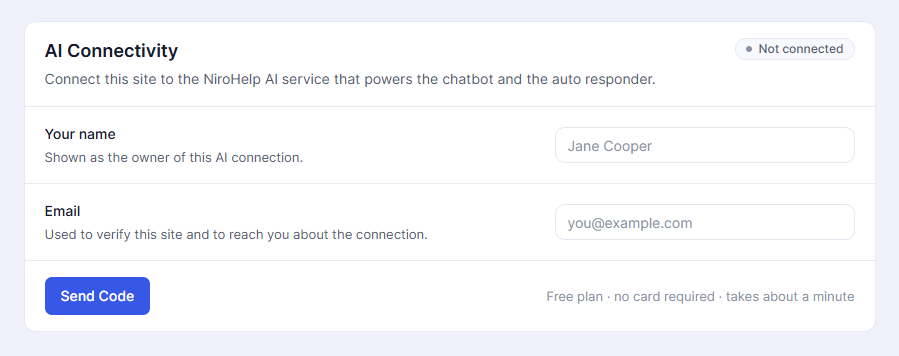
The language model does not run on your WordPress server. If your organization requires all AI processing to remain within its own infrastructure, this setup will not meet that requirement.
Read NiroHelp’s privacy and data information.
Tell Customers They Are Speaking With AI
If you use an AI chatbot, transparency is no longer just a matter of interface design.
Article 50 of the EU AI Act applies from 2 August 2026 and includes transparency requirements for interactive AI systems. The European Commission states that systems must be designed so people are explicitly informed when they are interacting directly with AI. Read the European Commission’s Article 50 guidance.
A simple opening could be:
“Hi, I’m your AI support assistant. I answer questions using our published documentation. If you need more help, you can submit a support ticket.”
Make the route to human support easy to find, and review your privacy disclosures for the external processing involved. Clear expectations help customers choose the right way to get assistance.
NiroHelp Pricing
NiroHelp is priced by site, with unlimited agents and tickets across plans.
| Plan | Price | Sites | Monthly AI Credits |
|---|---|---|---|
| Free | $0 | Unlimited installs | 300 |
| Starter | $9.99/month or $79.99/year | 1 | 1,000 |
| Growth | $29.99/month or $239.99/year | 5 | 6,000 shared |
| Agency | $49.99/month or $399.99/year | 10 | 15,000 shared |
Annual prices include the 20% early-bird discount; to grab this offer, apply this coupon EXTRA10 at checkout for an extra discount.
Per-site pricing lets you involve the people a ticket needs without adding a subscription charge for each person. Bring in a developer for a technical issue, add a seasonal agent, or give a manager access for quality reviews.
The subscription cost for the same licensed site does not increase because another agent joins.
When monthly AI credits run out, AI responses pause. Documentation, search, ticket submission, human replies, customer records, and the support dashboard continue working. Your team can keep helping customers while automation is paused.
Final Words: Give Your Team More Time to Help
So, as it stands..
Every repeated answer takes time your team could spend investigating a difficult issue or helping a frustrated customer. As support grows, that time becomes harder to find.
NiroHelp brings documentation, tickets, and AI support together inside WordPress. Customers can find answers, routine questions can receive documented guidance, and your team can focus on conversations that need personal attention.
You decide where automation helps and where a person should take over.
Start with NiroHelp’s free help desk on WordPress.org. Organize your documentation and tickets, bring your team on board, and add AI when you’re ready.
Frequently Asked Questions
Is NiroHelp Free?
Yes. The free plugin includes documentation, ticketing, migration tools, and unlimited agents and tickets. Paid plans add AI features and email piping.
Do I Need an OpenAI API Key?
No. Paid plans include AI credits, so you do not need a separate model-provider account or API key.
Can I Import My Existing Support Content?
Yes. NiroHelp supports seven WordPress documentation and support plugins. The records available for import depend on the source plugin.
Does NiroHelp Replace Human Agents?
No. It handles suitable questions using your documentation, while your team investigates complex issues and cases requiring judgment.
What Happens When AI Cannot Answer a Ticket?
If the available information does not meet your confidence threshold, the auto-responder stays silent and leaves the ticket for an agent.