Black Friday brings more sales to WordPress businesses, but it also means more support requests. Questions about discounts, license activation, failed downloads, and renewals can quickly overwhelm a small team.
Preparing ahead of time helps you manage tickets, reduce repetitive questions, and keep response times under control.
This guide covers how to prepare your documentation, organize support agents, and use AI responsibly during the Black Friday rush.
TL;DR: Black Friday Customer Support Checklist
To prepare your WordPress support team for Black Friday:
- Estimate ticket volume: Review previous campaigns and identify your busiest support periods.
- Update your knowledge base: Prepare answers for common questions about discounts, licenses, downloads, renewals, and refunds.
- Organize ticket assignments: Distribute incoming requests fairly and set realistic workloads for each agent.
- Plan support coverage: Schedule agents around peak hours and communicate expected response times.
- Test AI auto-replies: Automate straightforward, documented questions while keeping complex issues with human agents.
- Check your support system: Test ticket forms, notifications, AI credits, and customer access before the sale.
- Monitor performance: Track response times, recurring issues, and reopened tickets throughout the campaign.
How Many Support Tickets Should You Expect on Black Friday?
There isn’t one reliable number that tells every business how much support demand will increase during Black Friday.
A plugin company running a 50% discount might receive mostly pricing and renewal questions. A digital product store could see more download or payment-related issues. The number of tickets will depend on your customer base, campaign reach, and how well your checkout process works.
That’s why your own support history is the best place to start.
Use Previous Ticket Data to Estimate Volume
Open your support dashboard and look at the tickets received during last year’s Black Friday campaign.
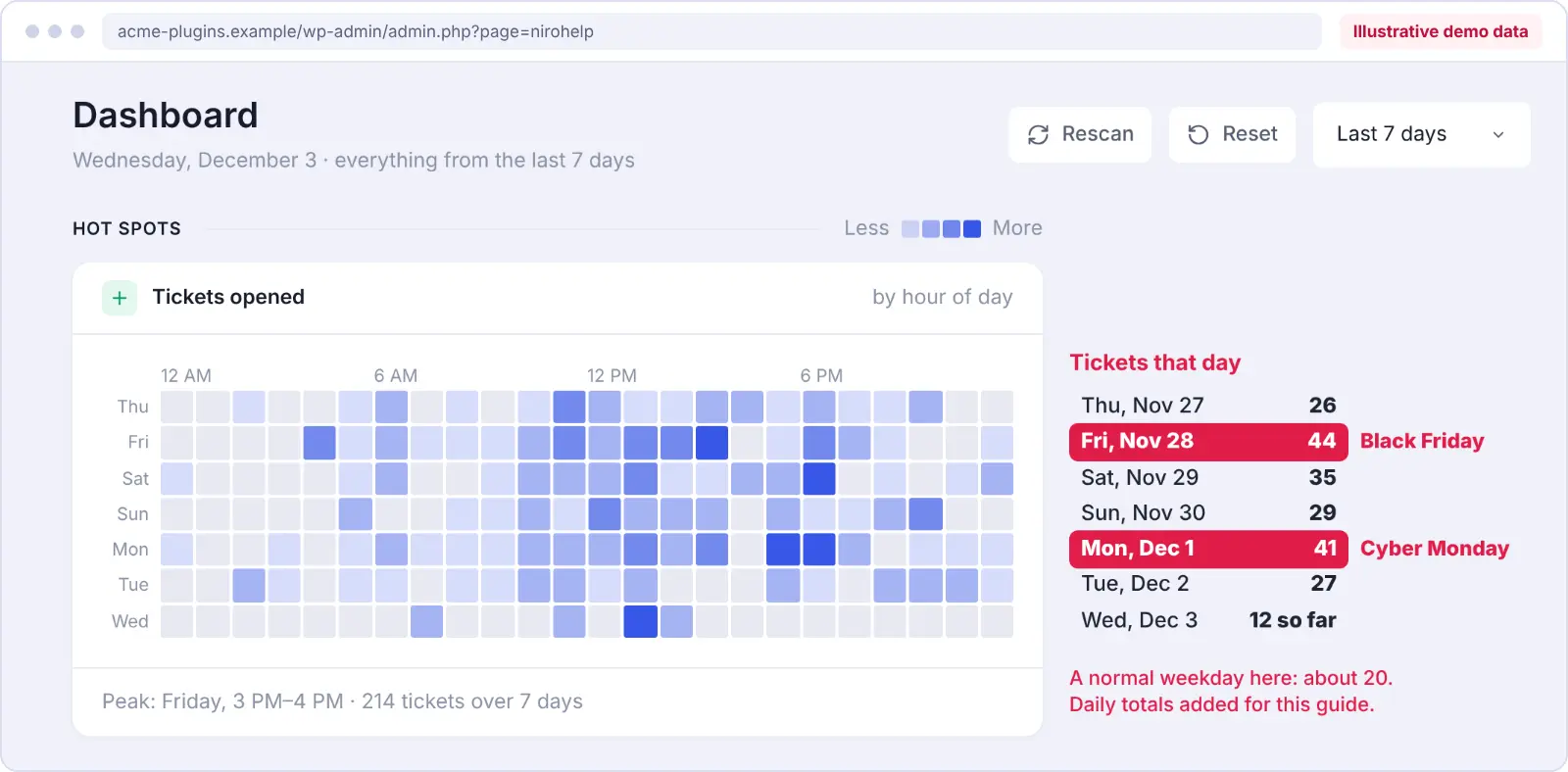
Check how many tickets arrived each day, which questions came up most often, and how long your team took to respond.
Then compare those numbers with a typical sales period.
If this is your first Black Friday campaign, use your current ticket volume and expected sales activity to create a planning estimate.
For example, imagine your WordPress business usually receives 20 support tickets per day.
You might prepare for the following scenarios:
| Scenario | Daily Tickets | What It Means |
| Normal day | 20 | Your usual support workload |
| 50% increase | 30 | Additional capacity may be needed |
| 100% increase | 40 | Repeat questions need to be handled efficiently |
These are illustrative scenarios, not industry benchmarks. Your actual ticket volume may be higher or lower.
Even a simple estimate helps you decide whether your existing team can manage the workload and which parts of your support process need attention.
Identify the Questions Customers Ask Most Often
More sales don’t necessarily mean completely new support problems. Often, customers ask the same questions more frequently.
For WordPress plugin sellers, common questions may include:
- Where can I download my purchased plugin?
- Why isn’t my license key activating?
- Can I use another coupon with the Black Friday discount?
- Will my subscription renew at the discounted price?
- Can I upgrade my existing plan during the sale?
- How do I request a refund?
If your team answers these questions individually every day, the workload can quickly become difficult to manage.
Before the campaign starts, review your recent tickets and group them by issue type. This will help you identify which questions can be answered through documentation and which still require personal assistance.
Prepare Your Help Documentation Before Black Friday
Your knowledge base should be one of the first things you review.
Customers often prefer finding an answer immediately rather than opening a ticket and waiting for a reply. Clear documentation also gives your support agents a reliable reference when similar questions arrive.
If you plan to use AI-powered support, accurate documentation becomes even more important.
Find Your 10 Most Common Support Questions
Start by reviewing tickets from the last 90 days. If you have data from last year’s Black Friday campaign, include that too.
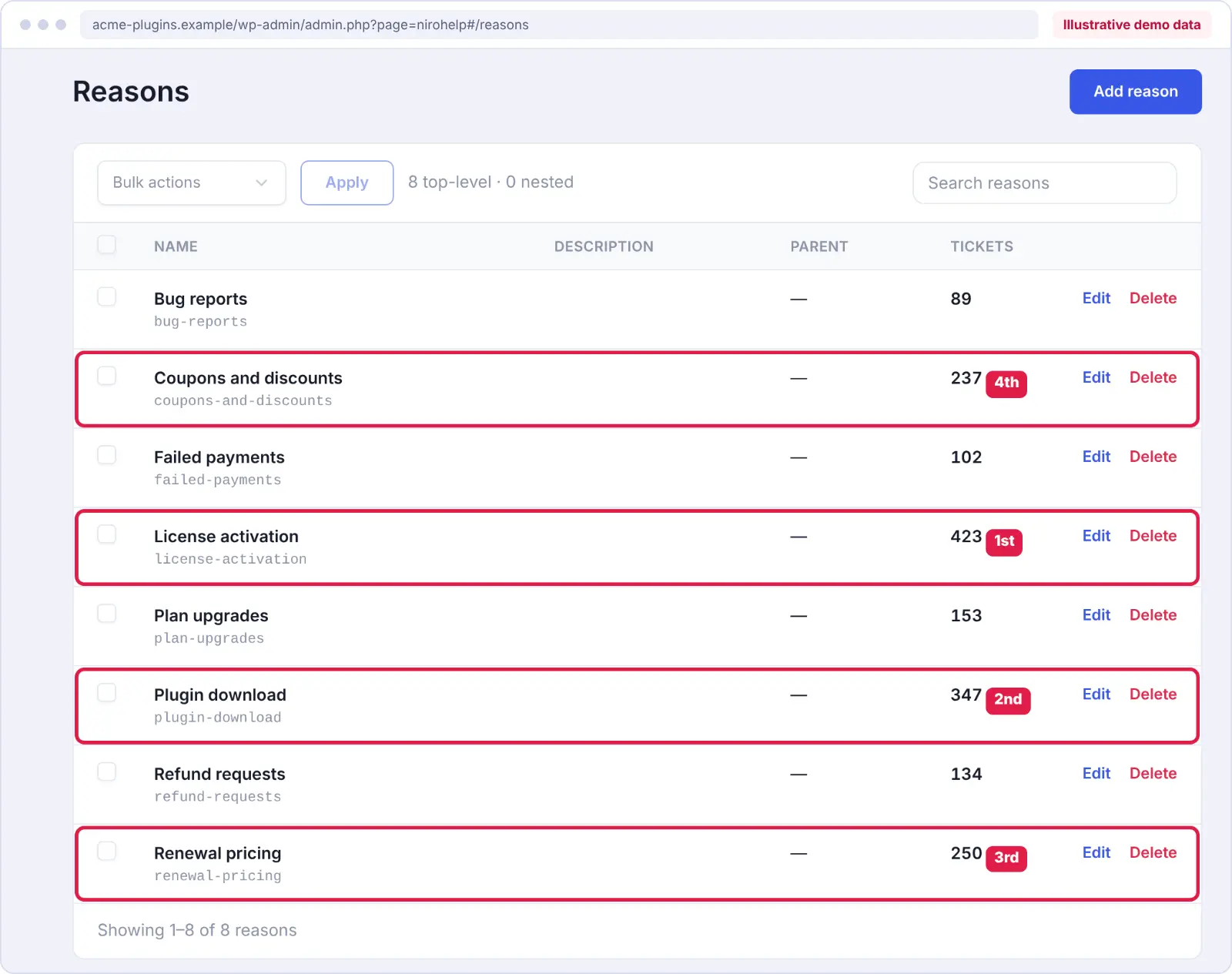
Group tickets by the actual problem rather than relying only on their subject lines.
For example, customers might submit tickets titled “License problem,” “Key doesn’t work,” and “Can’t activate Pro.”
Although the subjects are different, all three may belong to the same issue category: license activation.
Once you have grouped the tickets, identify the ten questions that appear most frequently.
Review the existing help articles for those questions. Update anything outdated and write new articles where information is missing.
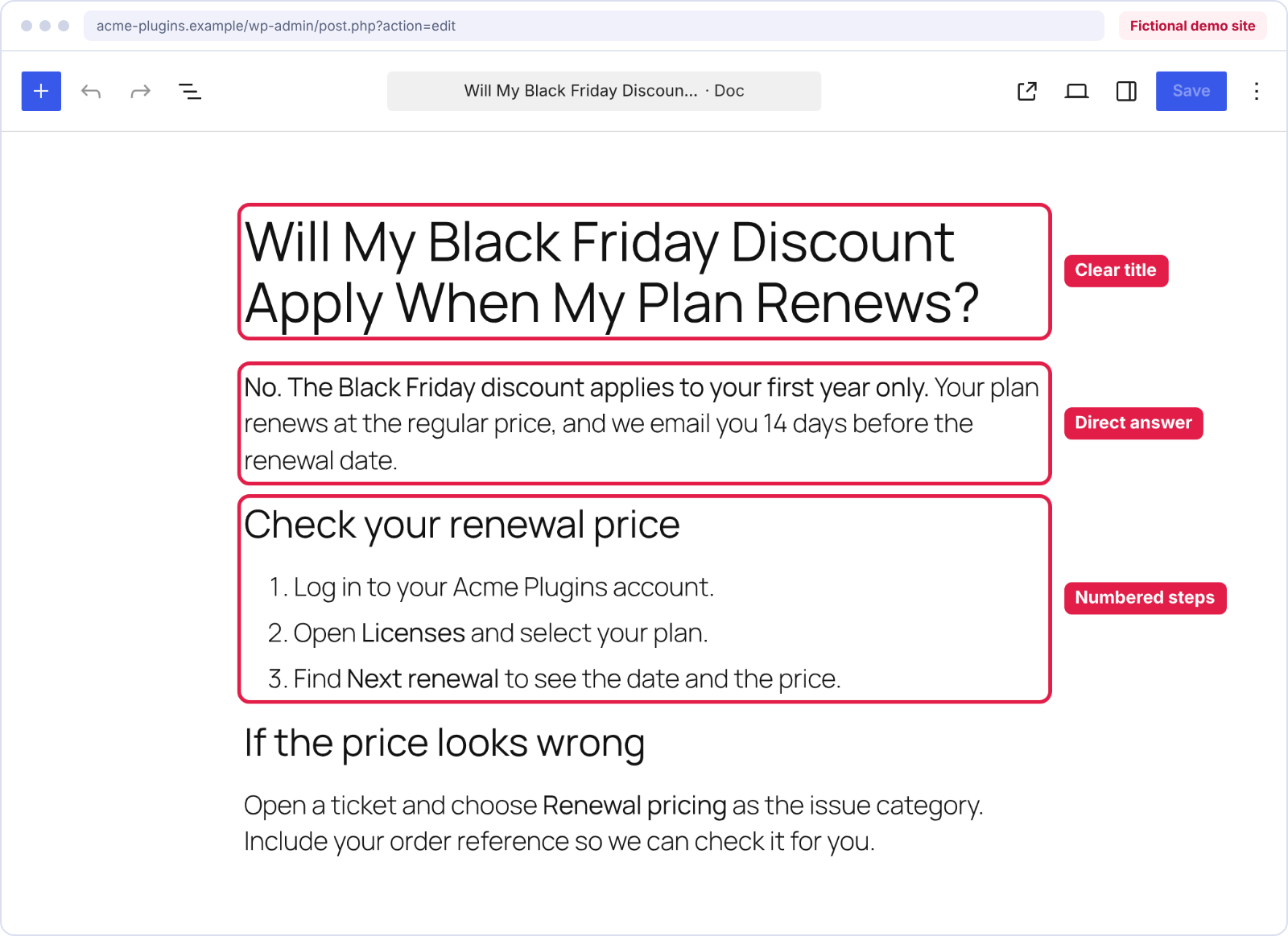
Each article should answer the main question near the beginning, followed by clear steps customers can follow.
For example, an article about license activation could explain where to find the license key, how to activate it, and what to check if activation fails.
Publish Help Articles for Black Friday-Specific Questions
Your regular knowledge base might not cover temporary offers, coupon restrictions, or promotional renewal terms.
Before Black Friday, publish short articles explaining:
- Which products and plans qualify for the discount.
- Whether coupon codes can be combined.
- How discounted purchases affect future renewals.
- Whether existing customers can upgrade during the campaign.
- Which refund policies apply to promotional purchases.
- What customers should do if payment or license activation fails.
The answers should reflect your actual promotional policies. Don’t assume that every discounted purchase follows the same renewal or refund rules.
Once these articles are ready, link to them from your pricing page, promotional emails, and order confirmation messages.
This gives customers access to the information at the point where they’re most likely to need it.
Keep Your Knowledge Base Easy to Navigate
Having the right answers isn’t enough if customers cannot find them.
Use descriptive article titles, organize related questions into categories, and avoid lengthy introductions before the actual solution.
For example, “How to Activate Your WordPress Plugin License” is clearer than “Getting Started With Your Purchase.”
If you’re using NiroHelp’s knowledge base, you can publish searchable documentation directly on your WordPress website and organize articles by topic.
This also gives your support team a central place to maintain answers instead of repeating the same instructions across multiple tickets.
Organize Your Support Team for the Black Friday Rush
Once your documentation is ready, focus on how tickets will move through your team.
For a team of two to ten people, clear ticket assignment rules and a realistic support schedule can make a significant difference.
Set Ticket Assignment Rules
Without a clear assignment process, one agent may end up with more tickets than everyone else.
For example, if your team has three agents and 45 open tickets, an uneven distribution could leave one person handling most of the workload.
A better approach is to decide how new tickets should be assigned before the campaign begins.
Depending on your help desk, you may be able to assign tickets in rotation or direct them to the agent with the fewest open tickets.
NiroHelp’s ticket management features include random, round-robin, and least-loaded assignment methods. You can also set a maximum number of open tickets per agent.
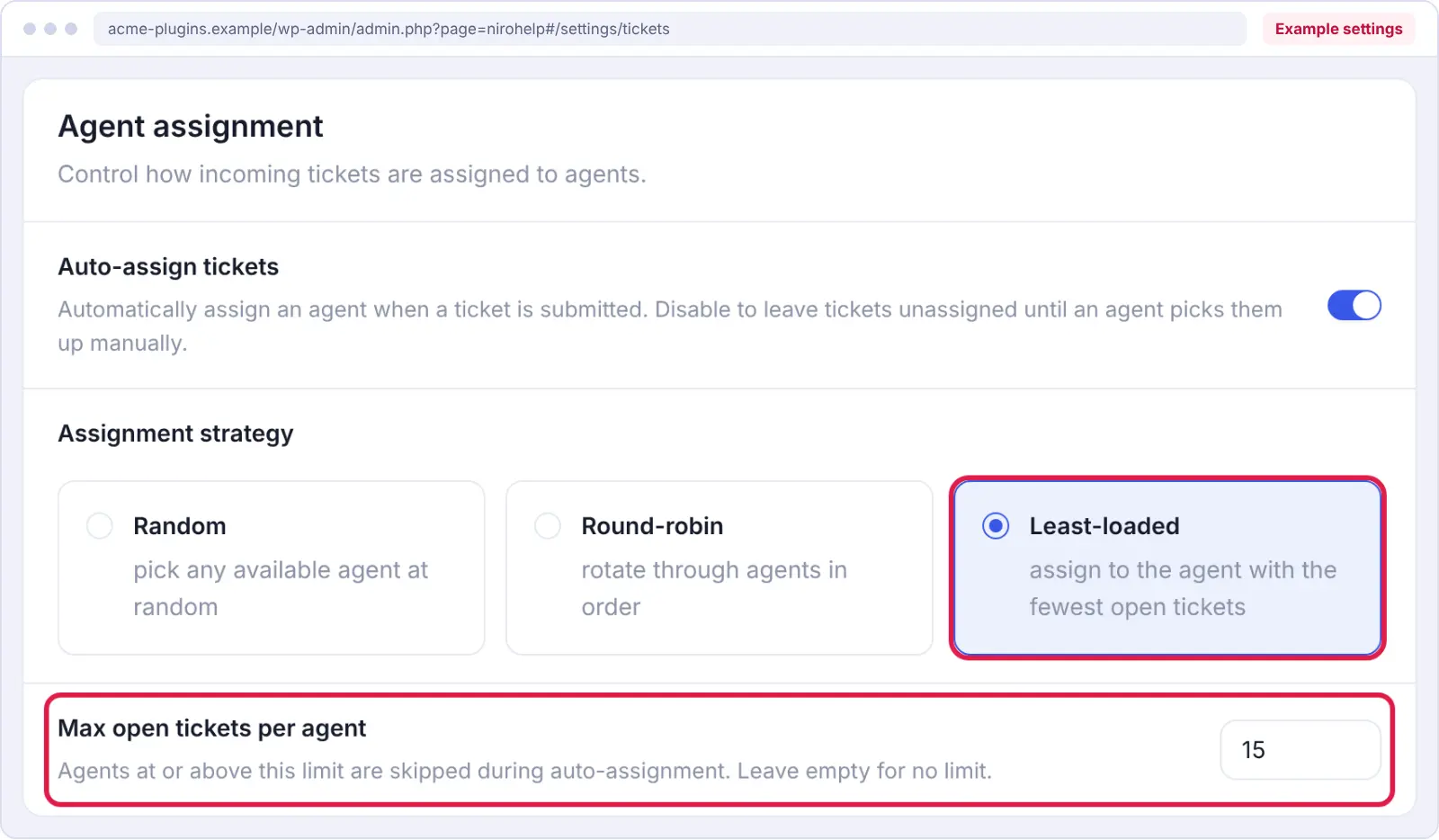
For a small team, least-loaded assignment with a reasonable ticket cap can be a useful starting point.
However, ticket counts don’t always reflect complexity. A complicated payment issue may take longer than several simple download questions, so a team lead should still review the queue regularly.
Prepare a Support Schedule
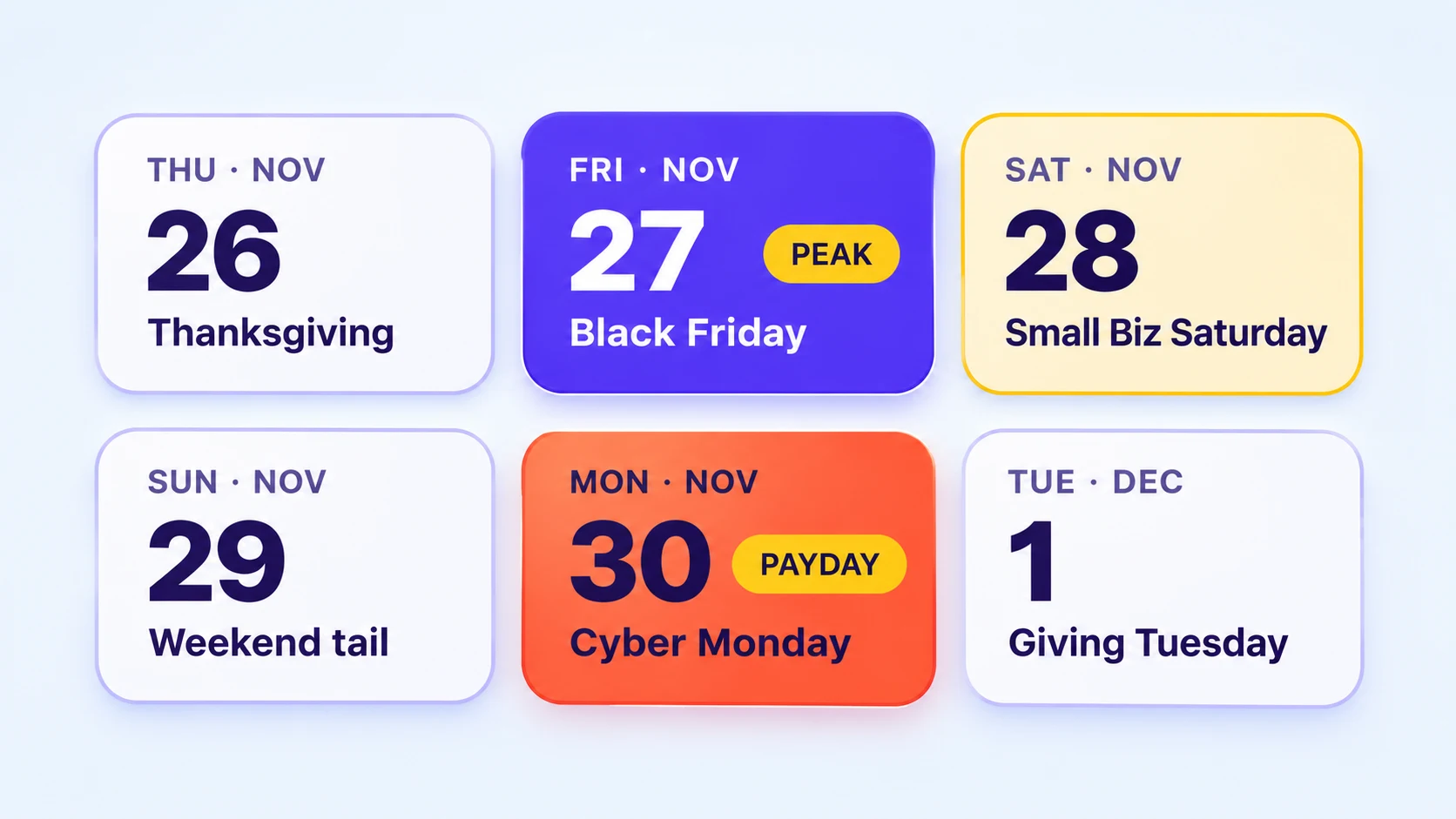
Black Friday 2026 falls on Friday, November 27, followed by Cyber Monday on Monday, November 30.
Customers may need help throughout the promotional period, including evenings and weekends.
You don’t necessarily need 24/7 support, but you should decide who will be available during your busiest hours.
Create a simple schedule showing each agent’s working hours, the person responsible for urgent issues, and who will take over when someone is unavailable.
Avoid assigning every busy shift to the same person. If the workload is expected to increase, plan breaks and backup coverage in advance.
Most importantly, communicate realistic response times to customers.
If your team usually responds within one working day, don’t promise instant assistance unless you have the capacity to deliver it.
Collect the Right Details Before Creating a Ticket
Support conversations often take longer because agents need to ask customers for missing information.
A ticket that says “My plugin isn’t working” gives the team very little to investigate.
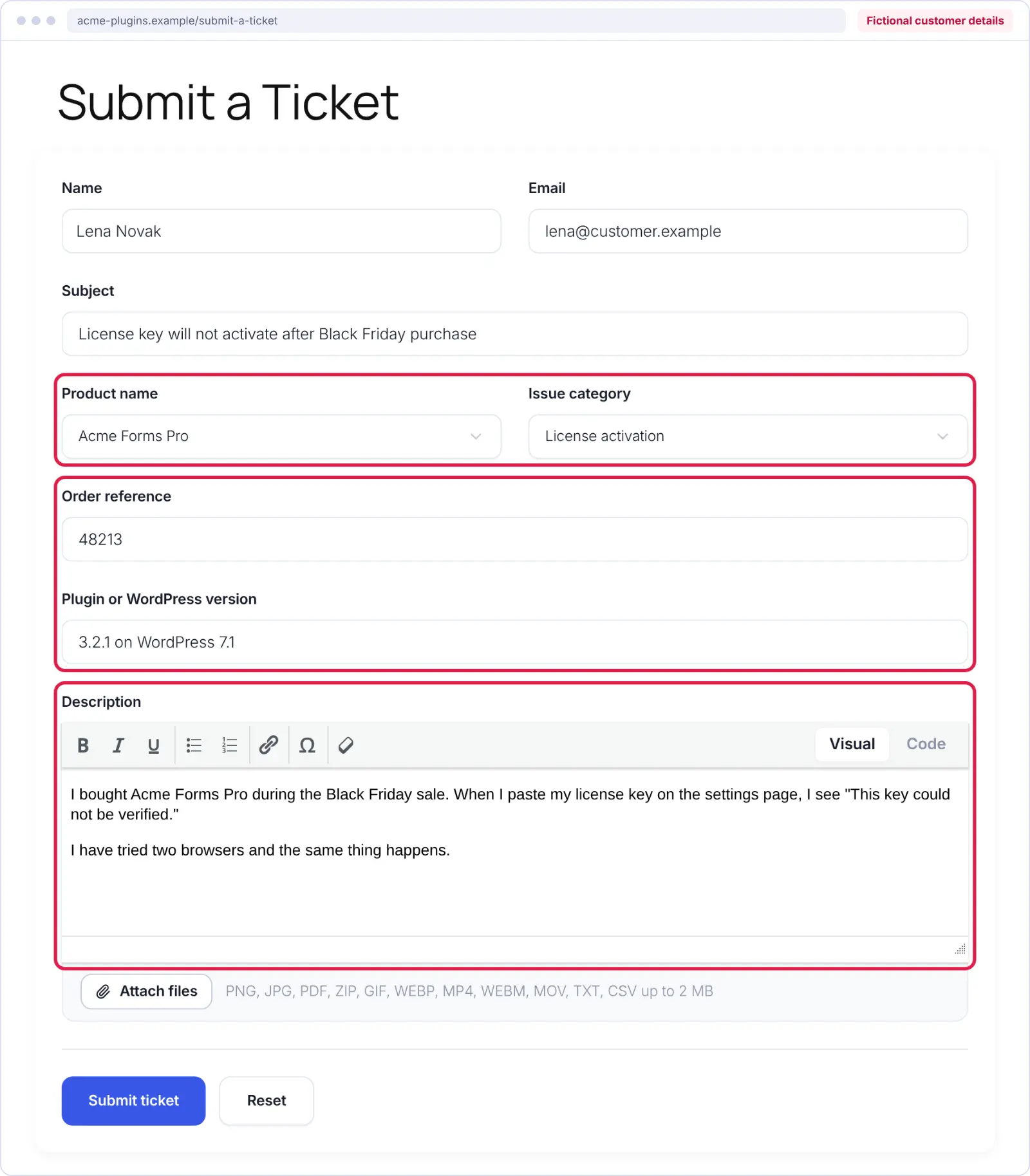
A more useful ticket might include the product name, plugin version, WordPress version, and a description of the problem.
Consider adding the following fields to your ticket form:
- Product name
- Issue category
- Order reference, when relevant
- Plugin or WordPress version
- Description of the issue
Avoid requesting full license keys, passwords, or payment information through ordinary support forms unless absolutely necessary. Use a secure process for sensitive details.
NiroHelp allows you to customize ticket forms with text fields, dropdowns, email fields, and other inputs without writing code.
Use AI Without Compromising Support Quality
AI can help manage repetitive questions, but it shouldn’t be responsible for every support request.
For small WordPress businesses, the most useful approach is to automate questions with clear, documented answers while leaving sensitive or complicated issues to a person.
Start With Questions Your Documentation Already Answers
Consider a customer who asks:
“Where can I download the plugin I just purchased?”
If your knowledge base contains accurate download instructions, an AI assistant may be able to answer without involving an agent.
Now consider another customer asking:
“Can you make an exception to your refund policy?”
That requires a decision based on your business policies and the customer’s circumstances.
The second request is better handled by a person.
NiroHelp’s AI auto-responder searches your synced help articles when a ticket arrives. It compares the question with the available documentation and replies only when the match clears the confidence threshold you’ve configured.
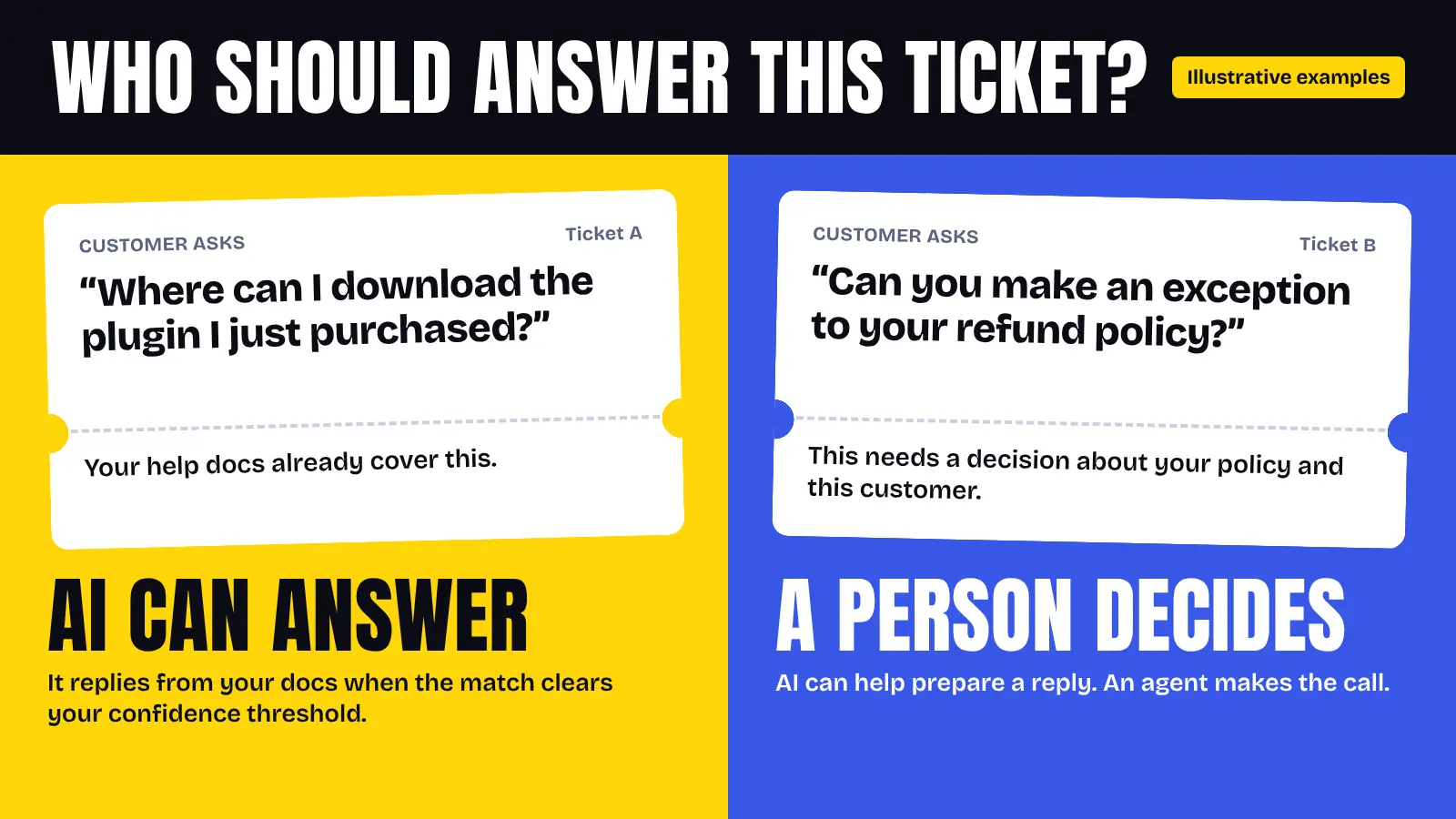
If it cannot find a sufficiently relevant answer, it stays silent and leaves the ticket for your team.
This makes documentation quality an important part of preparing your AI support workflow.
Review AI Answers Before the Campaign
Don’t enable automatic replies for the first time on Black Friday without testing them.
Start with common questions from recent support tickets and check whether the answers are accurate, complete, and consistent with your policies.
Pay particular attention to questions about discounts, renewals, refunds, and account access.
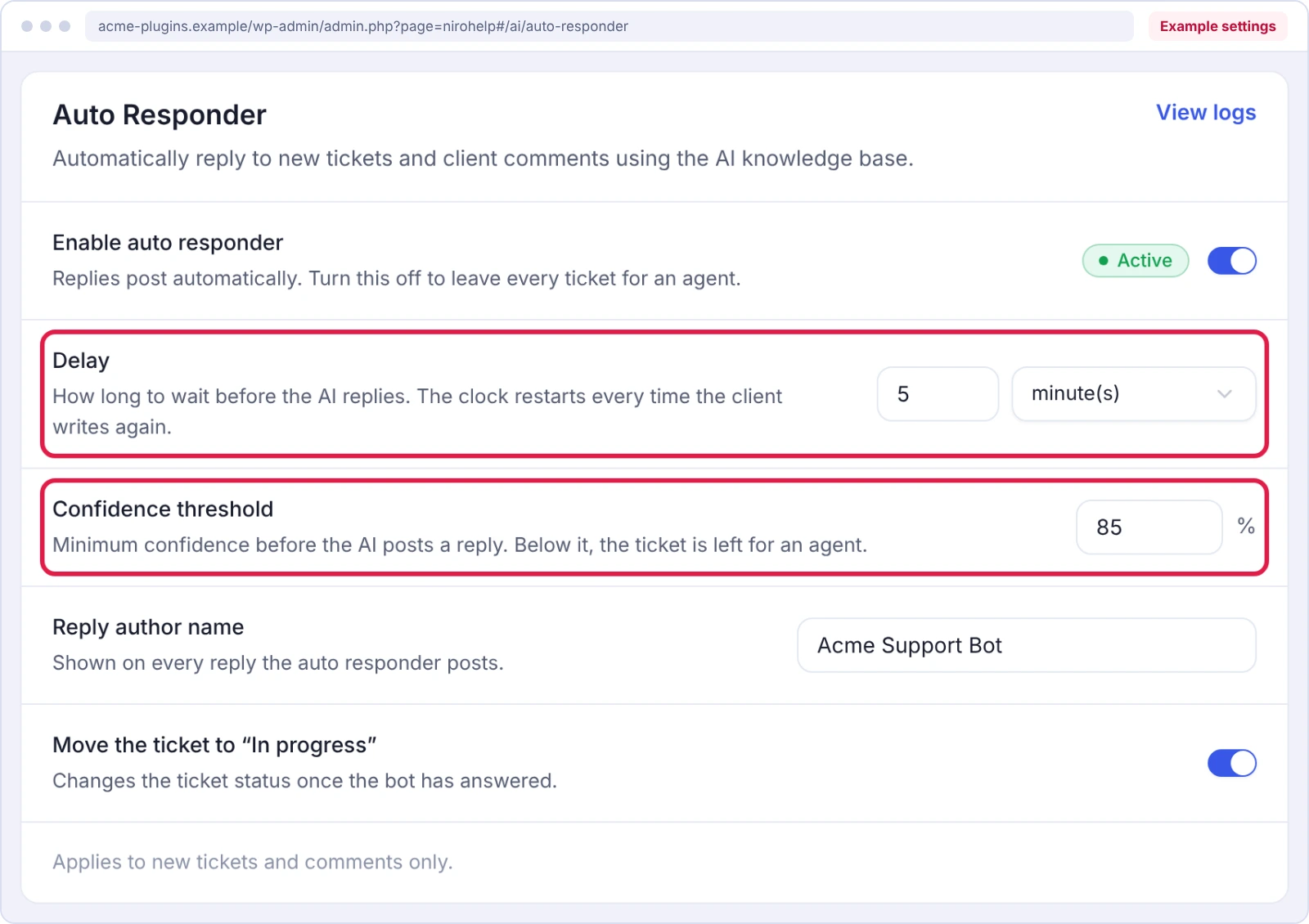
NiroHelp lets you configure an AI confidence threshold and a response delay. The documented default delay is five minutes, and an agent reply cancels a pending AI response.
For a new setup, begin with a higher confidence threshold and review the results before allowing the AI to handle more questions.
You should also check the circumstances in which AI replies need to be prevented or escalated. A confidence threshold alone does not guarantee that every sensitive request will be excluded.
Check Whether AI Is Resolving Problems
An AI response doesn’t necessarily mean a customer’s problem has been solved.
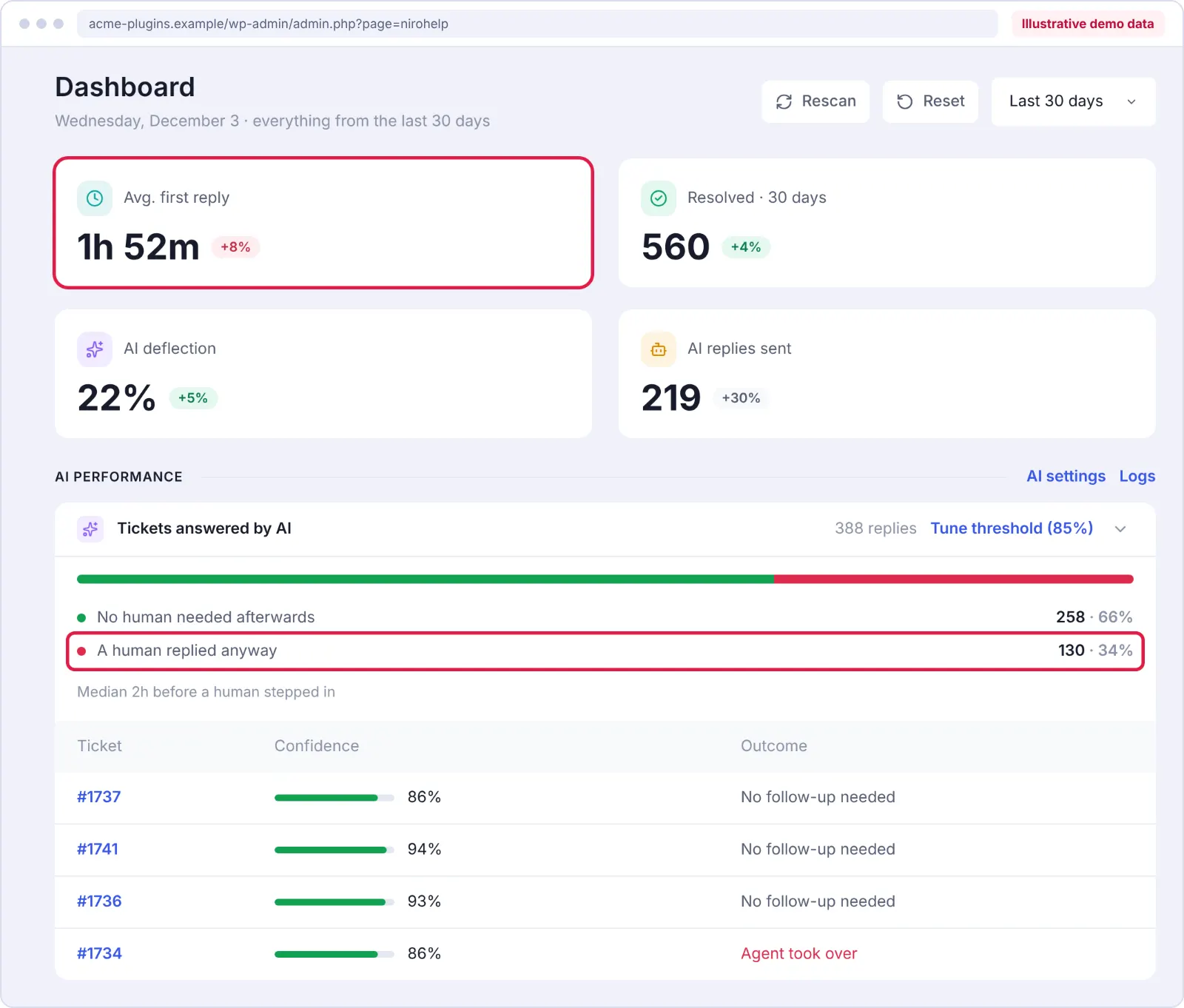
For example, a customer may receive an answer, try the suggested steps, and reopen the same ticket because the issue remains unresolved.
That’s why you should measure more than the number of automated replies.
Review how many tickets are reopened, how quickly customers receive their first response, and whether customers continue contacting support about the same issue.
NiroHelp’s dashboard includes AI-related support metrics and reply-time reporting.
Use these measurements alongside actual ticket conversations to understand whether automation is helping customers or simply reducing the number of tickets agents initially handle.
Check Your AI Credit Balance
If your support system uses AI credits or usage limits, check them before the promotional period.
In NiroHelp, paid plans include monthly AI credits shared across AI features. According to its official WordPress.org documentation, one credit represents one AI answer.
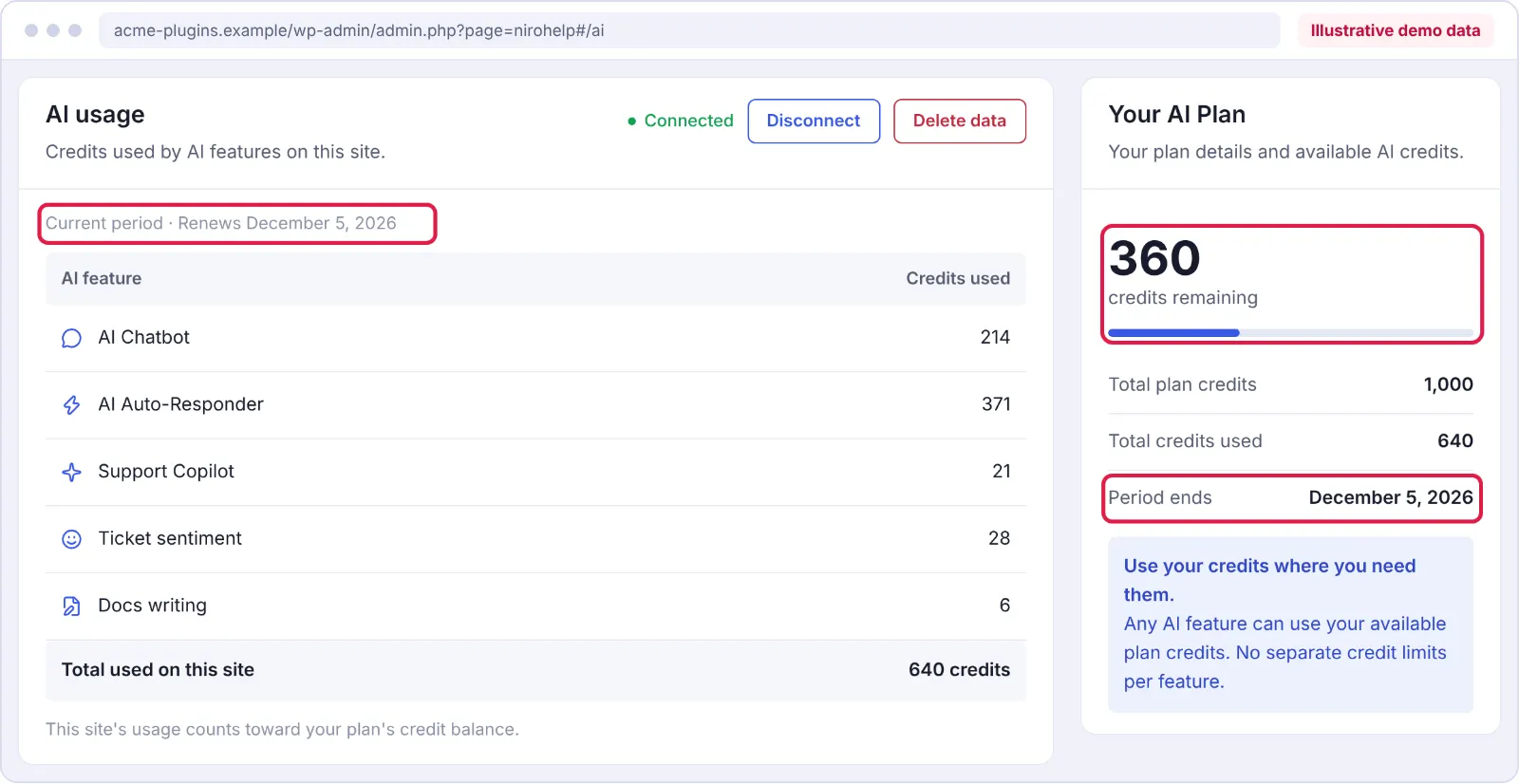
When the allowance runs out, AI features pause until credits become available again. Your regular knowledge base and support tickets continue working.
You can check the remaining allowance and renewal date in the Usage panel on the AI screen.
If your normal AI usage is already close to the monthly limit, decide which features matter most during Black Friday and prepare your team to answer those questions manually if needed.
Know Which Questions Need a Human
Not every customer issue should be automated.
Your support team should have a clear process for handling:
- Refund requests and chargebacks
- Billing or account changes
- Exceptions to promotional policies
- Security and privacy concerns
- Customers reporting serious technical failures
- Complaints that require careful investigation
You can still use AI to summarize information or help agents prepare a response, but a person should review the decision.
Make it clear to customers when they’re interacting with an AI assistant, and provide an accessible route to human support.
Your Black Friday Customer Support Checklist for 2026
With Black Friday approaching, the preparation process becomes easier when you divide the work into manageable stages.
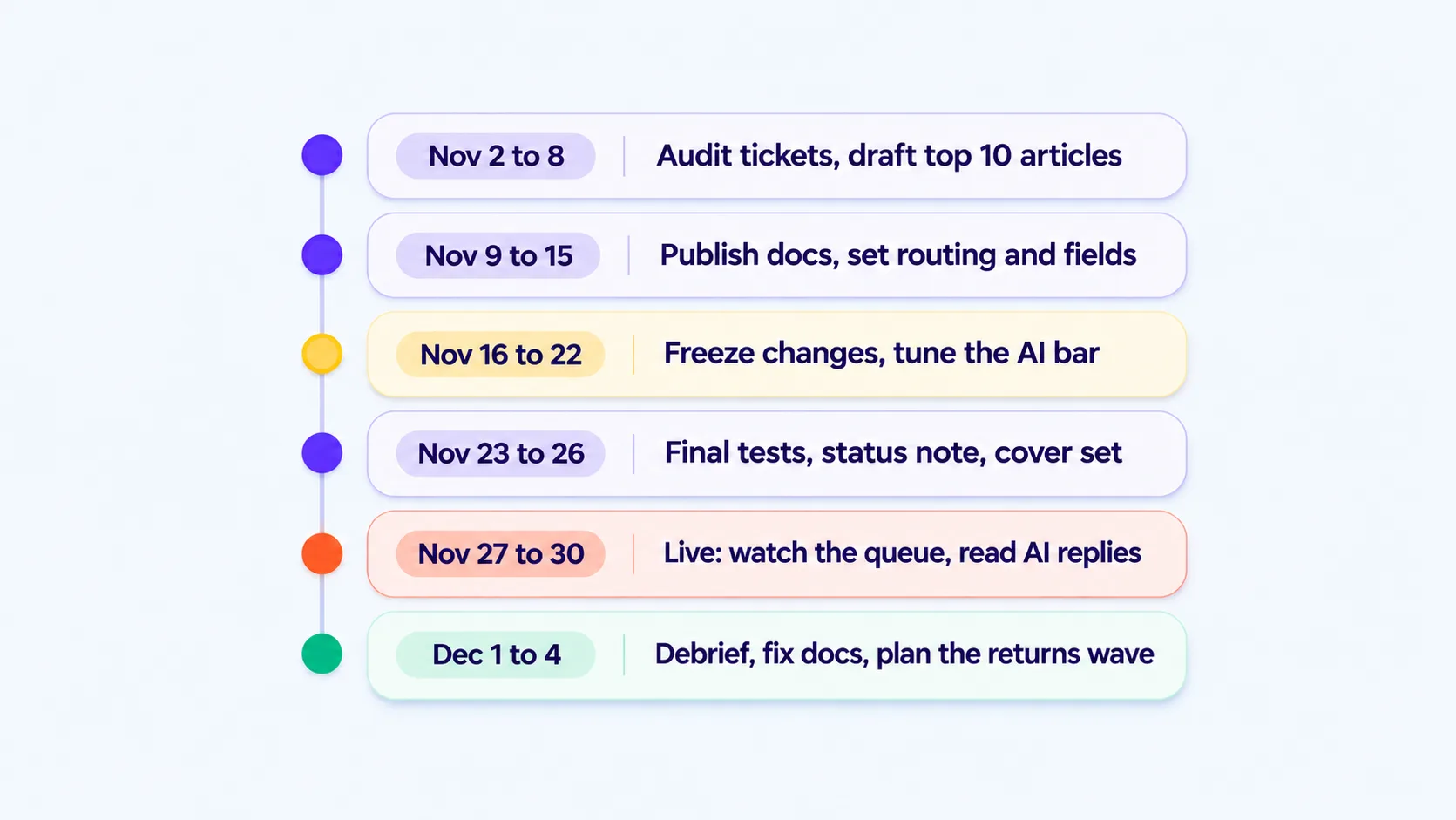
The following schedule is designed for small WordPress teams preparing for the November 27–30 shopping period.
| Dates | What to Do | Goal |
| Nov 3–8 | Review past tickets, estimate support volume, identify the top 10 questions, and draft missing help articles. | Understand expected demand and recurring issues. |
| Nov 9–15 | Publish documentation, update promotional FAQs, configure ticket assignment, and prepare response templates. | Make essential support information available before the sale. |
| Nov 16–22 | Finalize staffing, stop nonessential system changes, test AI responses, and check ticket routing. | Establish a stable support workflow. |
| Nov 23–26 | Run final checks, confirm support coverage, review AI credits, and fix urgent problems. | Make sure the team is ready for launch. |
| Nov 27–30 | Monitor ticket volume, first-response times, and AI answers. Update help articles when recurring questions reveal missing information. | Keep support manageable during the busiest period. |
| Dec 1–4 | Review ticket trends, response times, reopened tickets, and customer feedback. | Document improvements for the next campaign. |
The dates are planning recommendations, not mandatory deadlines. If your Black Friday campaign starts earlier or continues into December, adjust the schedule accordingly.
Test Your Support Workflow Before November 27
A few days before Black Friday, submit a test ticket through the same form your customers use.
Check whether it appears in the dashboard, reaches the appropriate agent, and triggers the expected notification.
Then test your knowledge base, customer portal, and AI assistant.
Make sure customers can access the help articles they need and that your team knows what to do when automated support cannot answer a question.
Once these checks are complete, avoid making unnecessary changes to your help desk during the campaign. Urgent fixes and documentation corrections may still be necessary, but larger migrations or redesigns are better scheduled outside the peak sales period.
Final Words: Get Your Support Team Ready for Black Friday
Black Friday doesn’t have to mean long queues and delayed replies.
Start by reviewing your most common support questions and updating your help articles. Then check your ticket assignment rules, prepare your team schedule, and test any automation you plan to use.
If you’re managing customer support through WordPress, NiroHelp brings your knowledge base and support tickets into one place.
You can start with the free NiroHelp plugin on WordPress.org and explore AI-powered support features when your documentation is ready.
The earlier you prepare, the easier it becomes for your team to focus on customers who genuinely need help.
Frequently Asked Questions
01. How many support tickets should I expect on Black Friday?
There is no fixed number. Review previous campaign data and compare it with your normal ticket volume. If you don’t have historical data, prepare a few workload scenarios based on expected sales activity.
02. Can a small team handle Black Friday customer support?
Yes, depending on ticket volume and complexity. Clear documentation, balanced ticket assignment, and realistic support hours can help small teams handle increased demand. Monitor the queue and arrange extra coverage if your estimates show a staffing gap.
03. Should I enable AI auto-replies before Black Friday?
Only after testing them with real support questions. Make sure your documentation is accurate, review the AI’s answers, and define which requests should be handled by a person.
04. Do I need to provide 24/7 customer support?
Not necessarily. Publish clear support hours and expected response times. Arrange additional coverage during your busiest periods if your customers are likely to need it.
05. What should I prepare first?
Start with your most common support questions. Updating your help articles gives customers a way to solve simple problems and helps agents respond consistently.