
Every ticket event, a step in a Bit Flows workflow.
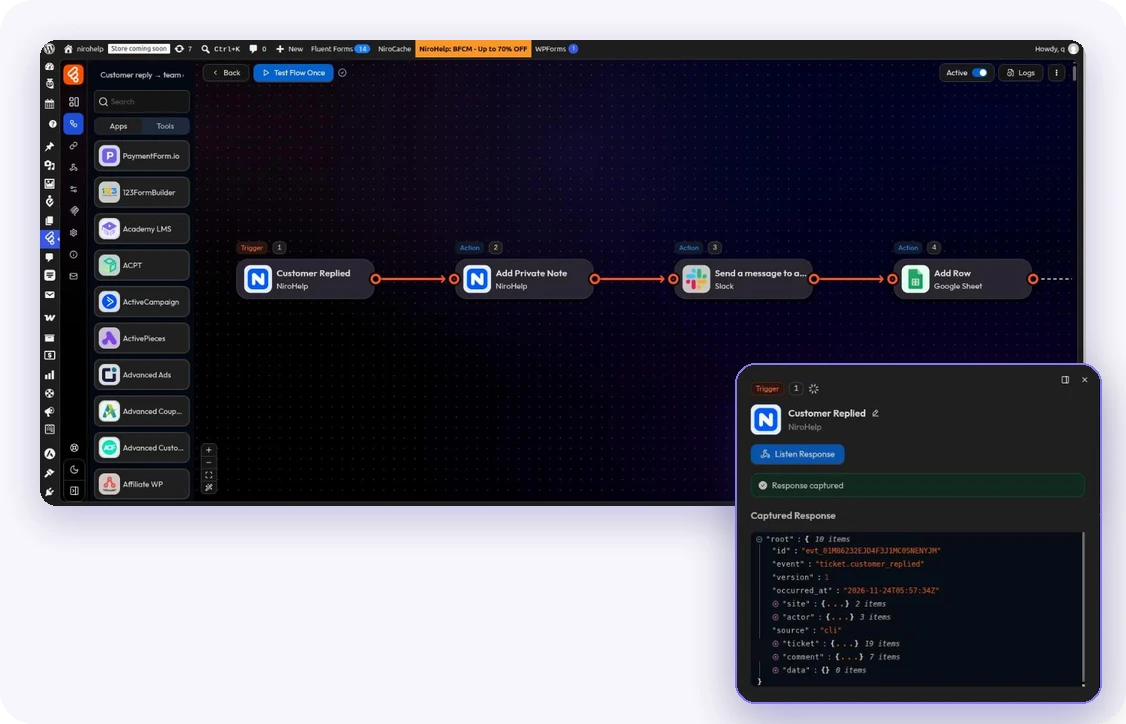
Bit Flows Pro ships a NiroHelp integration: 13 triggers that start a workflow when something happens on a ticket, and 20 actions that create, update and answer tickets, docs and customers from any other step. It runs on your own WordPress site, on NiroHelp’s own events — nothing to connect and no API key.
Why Bit Flows
Support events, wired into everything else
Same site, no keys
Bit Flows Pro listens to NiroHelp’s WordPress hooks and runs NiroHelp actions on the same site. There is no webhook URL to paste and no API key to store.
Any app on the other side
A new ticket can reach a spreadsheet, a CRM or a chat channel, and a form, an order or a booking elsewhere can open a ticket — whatever Bit Flows connects to.
The whole event, every time
Each trigger carries who did it and where, and the ticket — status, urgency, products, reason, agent, customer, sentiment and link — plus the reply or note when there is one.
Tested trigger by trigger
All 13 triggers were run against Bit Flows 1.34 and each fired once per event, with the change itself: the old and new status, the previous agent, the AI’s relevance score.
Coverage
Triggers and actions
What Bit Flows Pro lists under NiroHelp. Triggers start a workflow; actions are steps any workflow can run.
- Ticket triggers
- Ticket Created · Ticket Updated · Ticket Assigned · Ticket Status Changed · Ticket Resolved · Ticket Overdue · Negative Sentiment
- Reply triggers
- Ticket Replied · Customer Replied · Private Note Added
- Customer · AI triggers
- Customer Created · AI Answered · AI Escalated
- Ticket actions
- Create Ticket · Update Ticket · Change Ticket Status · Assign Agent · Set Sentiment · Get Ticket · Delete Ticket
- Reply actions
- Add Reply, as an agent or as the ticket’s customer · Add Private Note, seen by agents only
- Follow-up actions
- Set Follow-up, by date or in 1 to 730 days · Clear Follow-up
- Doc actions
- Create Doc · Update Doc · Move Doc to Trash · Delete Doc
- Setup actions
- Create Product · Create Reason · Create Topic · Create Customer · Add Agent
The details
Everything Bit Flows ships with.
- Requires
- NiroHelp and Bit Flows with Bit Flows Pro, on the same WordPress site. Every NiroHelp trigger and action is a Pro one in Bit Flows. Tested with Bit Flows and Bit Flows Pro 1.34.0.
- How it connects
- Triggers listen to NiroHelp’s nirohelp_event_{name} WordPress hooks; actions run inside the same site. Nothing to set up in NiroHelp.
- Trigger data
- The event name and time, the site, the actor, the source, the ticket (number, title, status, urgency, products, reason, agent, customer, sentiment, admin link, dates), the reply or note when there is one, and event-specific data.
- What changed
- Ticket Updated names each changed field with its old and new value; Status Changed and Resolved carry the old and new status; Assigned says whether it was manual and who had it before.
- Status changes
- Ticket Updated covers urgency, order, product, reason and custom fields. A status change fires Ticket Status Changed, and a move to Resolved fires Ticket Resolved as well.
- Ticket Overdue
- NiroHelp checks every 15 minutes against Overdue after (hours), and reports only tickets that became overdue in the last 3 days, so an old backlog does not flood a flow.
- AI triggers
- AI Answered carries the relevance score; AI Escalated carries the reason, the score and the threshold. When the AI first asks which product the customer means, neither fires.
- Where to configure
- In Bit Flows: open a flow and pick NiroHelp as the trigger or as an action app.
Common questions
Yes. Bit Flows lists every NiroHelp trigger and action as Pro. On the NiroHelp side, the integration needs nothing beyond the free plugin.
No. There is no Bit Flows card under Integrations: Bit Flows finds NiroHelp on the same site and listens to its events. You build the workflow in Bit Flows.
Yes. Start the workflow with that app’s trigger, then add NiroHelp’s Create Ticket action and map its fields — the customer, the subject and message, reason, urgency, agent and your custom ticket fields. A customer with no account gets one.
Each trigger fires once per event. One change can be two events, though: resolving a ticket fires both Ticket Status Changed and Ticket Resolved, and a customer’s reply fires both Ticket Replied and Customer Replied.
Ready to set up Bit Flows?
NiroHelp is free — install it beside Bit Flows Pro and pick NiroHelp in any flow.