
Fluent Forms submissions, turned into tickets.
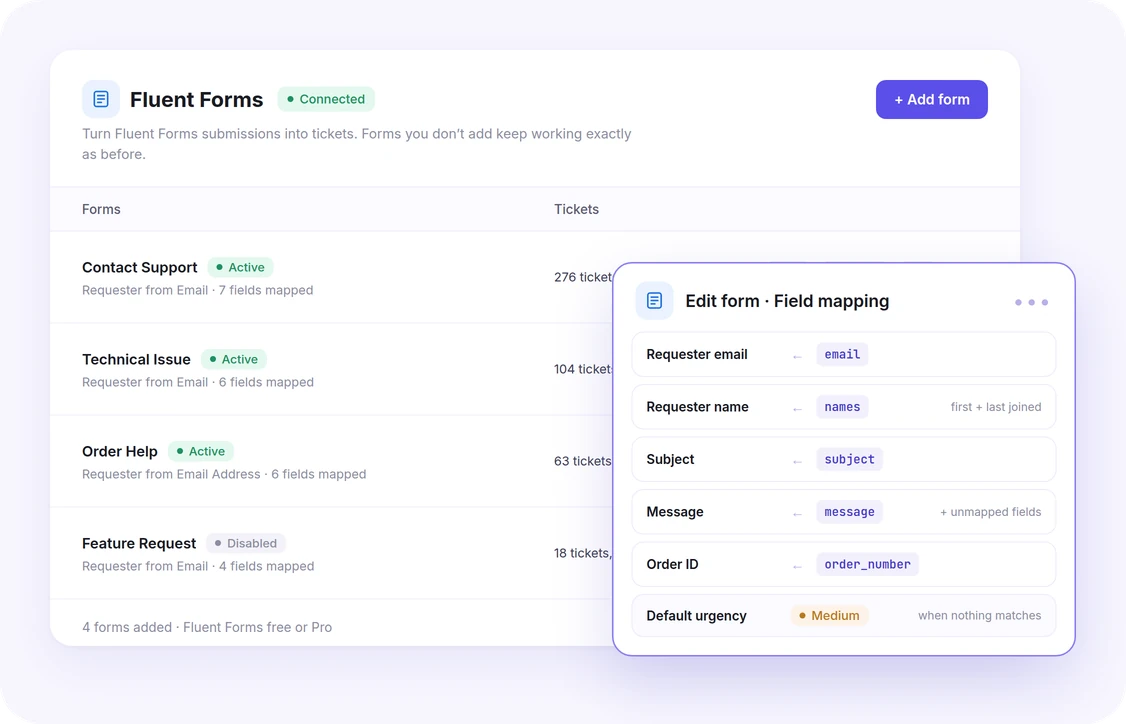
Keep the Fluent Forms forms your customers already use, on the free plugin or Pro. Add a form to NiroHelp, map its fields onto the ticket, and every submission joins the same queue, assignment, AI replies and history as a ticket from your own form.
Why connect it
Keep the form, lose the inbox
Only the forms you choose
Add forms one at a time. Any form you leave out keeps working as before, and any form you add can be disabled or removed on its own.
Mapped field by field
Pick the requester, subject and message — and product, reason, urgency, order ID or your own ticket fields. Fields inside columns are offered too, and a mapping remembers each field by its name, so editing a label changes nothing.
Spam stays out
Submissions Fluent Forms’ spam protection flags — Akismet or CleanTalk — never become tickets, and a double submit within 10 minutes opens just one.
Sensitive fields stay out
Password, payment, consent and captcha fields are never copied onto a ticket, and layout such as section breaks and custom HTML is skipped. Everything else you did not map is kept in the ticket’s message.
Field mapping
What a form field can fill
Each part of the ticket gets a picker of the form’s own fields. Only the requester’s email is required; product, reason and urgency fall back to the form’s defaults.
- Requester email
- Required. The ticket is filed under the account this address belongs to, and its sign-in link is mailed there.
- Requester name
- A Name field’s first, middle and last name are joined into one.
- Subject
- The ticket’s title. Left unmapped, it names the form.
- Message
- The ticket’s body, followed by every field you did not map.
- Product · Reason
- Matched to an existing product or reason by its name, slug or ID.
- Urgency
- Low, Medium, High or Severe, by key or label.
- Order ID
- Stored on the ticket, as the ticket form stores it.
- Custom fields
- Any custom field switched on in the ticket form under Settings → Tickets → Form fields.
The details
Everything Fluent Forms ships with.
- Requires
- Fluent Forms (free or Pro) installed and active, and the tickets module on.
- Forms
- Added one by one, each Active or Disabled, with its own mapping and defaults. A form that is never added opens no tickets.
- Triggers
- A submission Fluent Forms saved after validation opens a ticket. One its spam check skipped, or only marked as spam, does not.
- Spam and duplicates
- Entries that fail validation or that Akismet or CleanTalk flag never reach NiroHelp, and the same submission within 10 minutes opens one ticket.
- If a ticket can’t open
- The visitor still sees Fluent Forms’ normal confirmation, and the failure is logged on the site.
- Attachments
- Fluent Forms Pro’s File Upload and Image Upload fields: files are copied onto the ticket under NiroHelp’s own allowed types and size limit; a refused file is listed in a private note, and an upload that cannot be traced to a file keeps its address in the message.
- New customers
- Someone with no account gets a ticket only while guest submissions and account creation are both allowed. The screen says when that is turning people away.
- Source
- The ticket shows “Fluent Forms · form title” in the Tickets list, and keeps that label if the form is renamed or deleted.
- If Fluent Forms is off
- Forms stop opening tickets, nothing breaks, and the mappings are still there when it comes back.
- Where to configure
- NiroHelp → Integrations → Fluent Forms, inside the admin dashboard.
Common questions
Yes. Everything works on the free plugin; file and image uploads need Fluent Forms Pro, because those fields are Pro fields.
No. Fluent Forms keeps handling its entries and emails as before; NiroHelp only reads a submission once you add that form and map its fields.
The mapping is stored with the form in Fluent Forms, so it goes too. Tickets the form already opened stay.
If the AI auto-responder is on, yes — a Fluent Forms ticket is answered under the same confidence threshold and delay as any other.
Ready to set up Fluent Forms?
It’s part of the free core plugin — install NiroHelp and turn it on under Integrations.