
A bug report, filed on GitHub from the ticket.
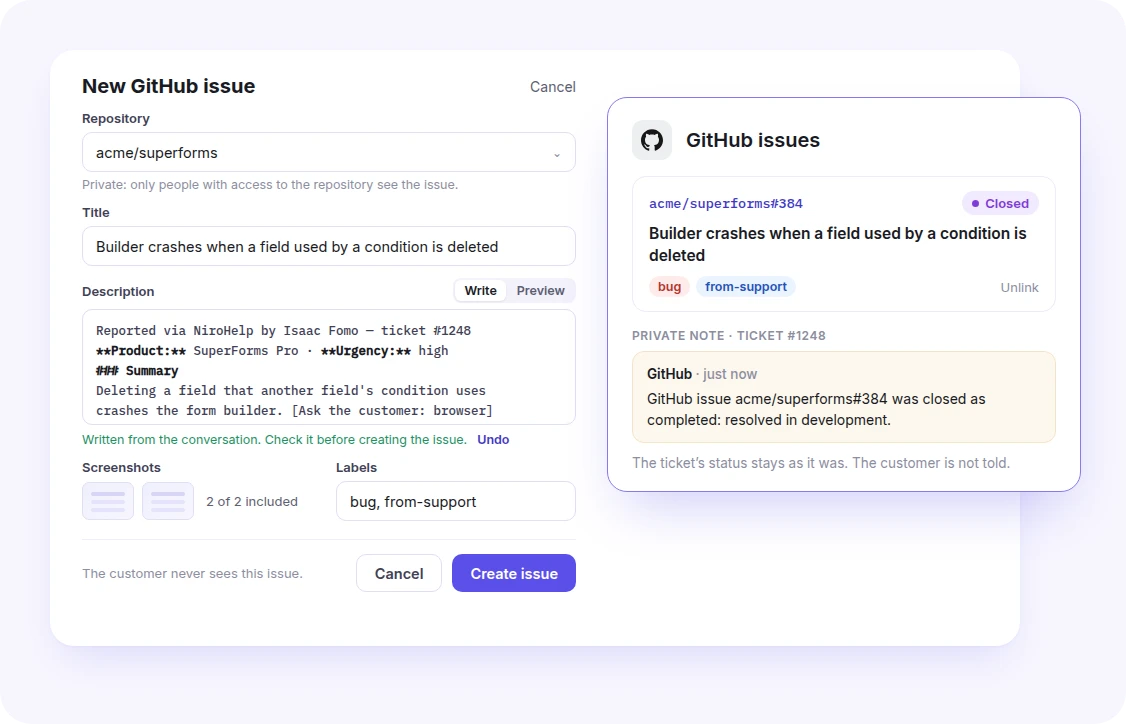
With NiroHelp Pro, an agent turns a confirmed bug into a GitHub issue without leaving the ticket — written from the conversation by the AI if you like, with the customer’s screenshots — and the ticket shows when the developers close it. Agents never sign in to GitHub, and the customer never sees the issue.
Why connect it
Support and development, on the same bug
Filed from the ticket
Pick a repository, check the title and description, add labels and create the issue from the ticket’s edit screen. Anyone who works the ticket queue can file one; only an administrator connects GitHub.
Written for developers
Write it with AI turns the whole conversation into a developer-style title and description, marking any detail still to ask the customer. It costs one AI credit, and Undo puts back what was there.
Customer details stay private
The AI sees speakers as Customer and Support, without internal notes, and is told to leave personal details out. The issue links the ticket’s wp-admin screen, never the customer. Public repositories get a warning first.
You hear when it’s fixed
The issue’s state follows GitHub. Closed as completed, the ticket gets a note: resolved in development. The ticket’s status never changes by itself, and the customer is never told.
On the ticket
What the GitHub box does
A GitHub issues box on each ticket’s edit screen in wp-admin, for anyone who can manage tickets. A ticket is about one problem, so it gets one issue.
- Create issue
- Repository, title, a Markdown description with Write and Preview, and labels. The form says whether the repository is private or public before you file.
- Write it with AI
- A title and description from the whole conversation, for one AI credit. Undo restores what you had. Needs NiroHelp AI connected.
- Screenshots
- The images the customer attached, plus any you upload, shown in the issue through private links this site serves, or listed by name where GitHub cannot reach the site. Unlinking stops sharing them.
- Public repositories
- A reminder to remove the customer’s name, email, order or licence first. Screenshots are listed by name unless you choose to show them as images.
- Issue state
- Open, Closed, Not planned or Deleted, with its labels, kept in step with GitHub — an issue moved to another repository included.
- Internal notes
- One for each issue created, unlinked or changing state, so the history is in the thread. Agents see them; the customer does not.
- Unlink
- Takes the issue off the ticket. It stays on GitHub as it is.
The details
Everything GitHub ships with.
- Requires
- NiroHelp with the tickets module on, and NiroHelp Pro. Write it with AI also needs NiroHelp AI connected.
- Connecting
- Once, by an administrator: GitHub shows a code to approve, then the NiroHelp GitHub App is installed on the repositories you choose. Connect with a shared support or bot account rather than your own.
- Access
- The app asks for Issues (read and write), repository webhooks and metadata — never your code. It has no private key, so Codexpert cannot reach your repositories; only your site can.
- Repositories
- Those the app is installed on that the connected account can also reach. On an organisation, an owner installs it or approves the request.
- The issue
- The summary, the product and urgency, the screenshots, and the agent who filed it, with a link to the ticket in wp-admin. It adds no name or email; the draft quotes the customer, so check it.
- Live updates
- Where GitHub can reach the site, each repository gets its own signed webhook with its first issue; that needs admin rights on the repository. Elsewhere the box asks GitHub each time it opens, and an unchanged issue costs nothing against GitHub’s rate limit.
- Credentials
- GitHub’s tokens are stored encrypted in their own option, refreshed automatically and never sent to the browser. A lost connection shows an admin notice.
- Disconnect
- Forgets the tokens and removes the site’s webhooks. To revoke access on GitHub too, remove NiroHelp from the account’s authorized GitHub Apps.
- Where to configure
- NiroHelp → Integrations → GitHub, with NiroHelp Pro active.
Common questions
No, it is a NiroHelp Pro feature. Without Pro, the GitHub card under Integrations shows what Pro adds.
No. The site connects once, and every issue goes through that connection, credited to the connected account. The issue names the agent who filed it.
No. The ticket gets a note saying how the issue was closed — resolved in development, or not planned — and its status stays where your team left it. The customer is not told.
Yes, with care: anyone can read the issue. NiroHelp reminds you to remove the customer’s details first, and lists screenshots by name unless you tick the box to show them, after which anyone can open them and GitHub may keep a copy.
Ready to set up GitHub?
GitHub comes with NiroHelp Pro — install the free plugin, add Pro, and connect GitHub under Integrations.