

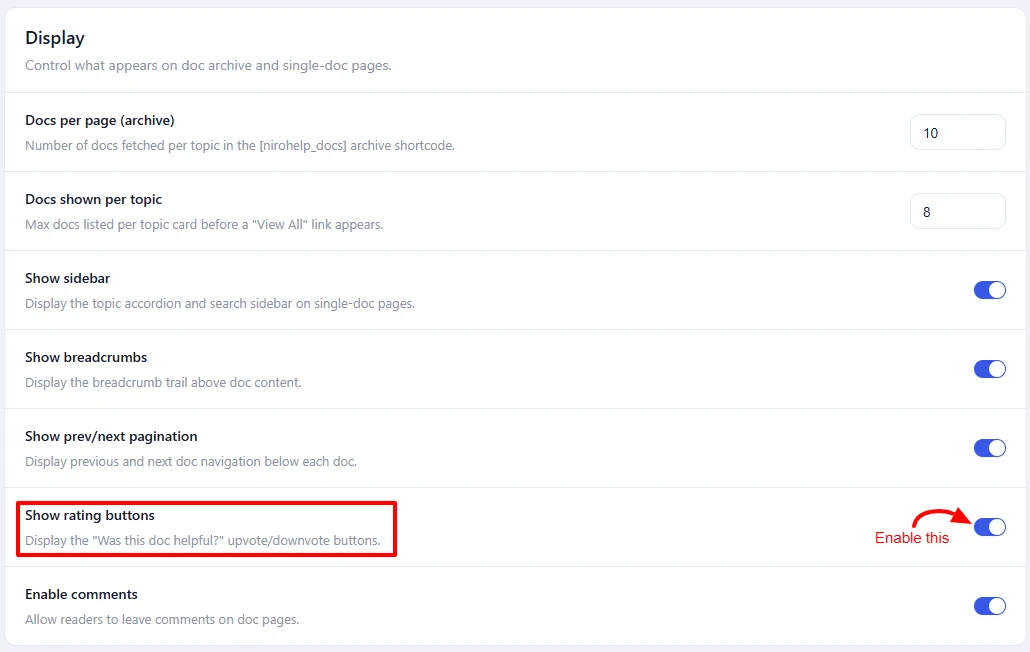
Each doc can show a helpful / not-helpful pair of buttons under the article. They appear when Settings → Documentation → Display → Show rating buttons is ticked, which it is by default.
Who can vote
Anyone who can load the page. Readers do not have to be logged in.
Votes can only be cast from your own site – a vote arriving from anywhere else is rejected – so the buttons are not open to being scripted from another website.
What is recorded
Two running totals on the doc: upvotes and downvotes.
Nothing about the voter is recorded. No name, no account, no address, no identifier of any kind. Only the two counters exist.
There is no duplicate-vote protection
This is worth being explicit about, because it is easy to assume otherwise.
After someone votes, the buttons on that page are disabled. That is the whole of it. No cookie is set and nothing is remembered. Reloading the page re-enables the buttons, and the same visitor can vote as often as they like.
Treat the counts as a rough signal of engagement rather than a poll result. If you need one vote per reader, that needs custom work — and even then, anything short of requiring a login is per-browser rather than per-person.
Using the numbers
Two things worth doing with them:
- Find articles to rewrite. Sort by downvotes and start at the worst.
- Find your best articles. Sort by upvotes and feature them on a landing page or in onboarding.
Both counts are columns on NiroHelp → Docs, and Doc helpfulness – the share of votes that were positive – is one of the eight headline figures on the dashboard. Docs readers voted down get their own dashboard panel.
Resetting votes
There is no reset button. Clearing the counters for a doc, or across the whole library, needs a developer or a database tool.
Moving a doc to the trash and restoring it keeps the counts. Only deleting the doc permanently removes them, along with the doc.
Was this doc helpful?