

The chatbot and the auto responder do not see your documentation until you sync. That one button is the whole pipeline you have to think about.
Where the button is
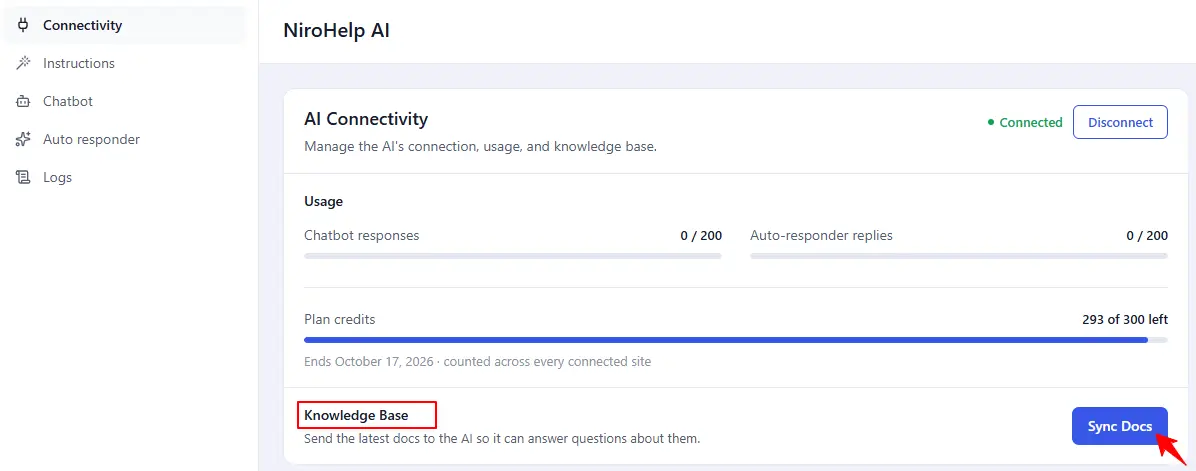
NiroHelp → AI, on the AI Connectivity card, in the Knowledge Base row. It is labelled Sync Docs and it only appears once the site is connected.
There is one sync action. There is no “resync all”, and nothing syncs on a schedule.
What happens
- You write or edit a doc in WordPress.
- You click Sync Docs.
- The service reads your published docs and indexes them.
- From then on, every chatbot question and every auto-responder reply is built from the most relevant parts of those docs.
The screen reports how many docs were taken: “Synced N docs.”
What it does not tell you
It reports the sync you just ran, not when the last one happened. No sync timestamp is recorded anywhere, so there is no “synced 2 hours ago” to show. Reopening the screen shows the button with nothing under it, whether you synced five minutes or five weeks ago.
Why a button and not automatic
- Predictability. You decide when content goes live for the AI. A doc you are still editing never turns up in an answer.
- Cost. Indexing is billed by volume. Re-indexing on every save adds up; a manual sync batches the work.
After an edit
The AI keeps answering from the last sync until you run another one. Make clicking Sync Docs the last step of an editorial pass, the way you would publish.
The reminder notice
When your docs change after a sync, an admin notice appears pointing back at this screen. It only shows to administrators, and only on a connected site. Running a sync clears it, and so does its own Dismiss link.
After a migration
Imported docs are not in the index until you sync. Run one as the last step of migrating from another plugin.
Was this doc helpful?