

Home » Ticket Management » Urgency levels
Every ticket carries an urgency. There are four levels and they are fixed: Low, Medium, High, Severe.
There is no screen to add or rename them. This is a deliberately small, opinionated set.
Where the urgency comes from
- Front end: the Urgency dropdown on the new-ticket form, optional by default. Nothing is pre-selected, so a ticket can arrive with no urgency at all. Make the field required under Settings → Tickets → Form fields if you need one on every ticket.
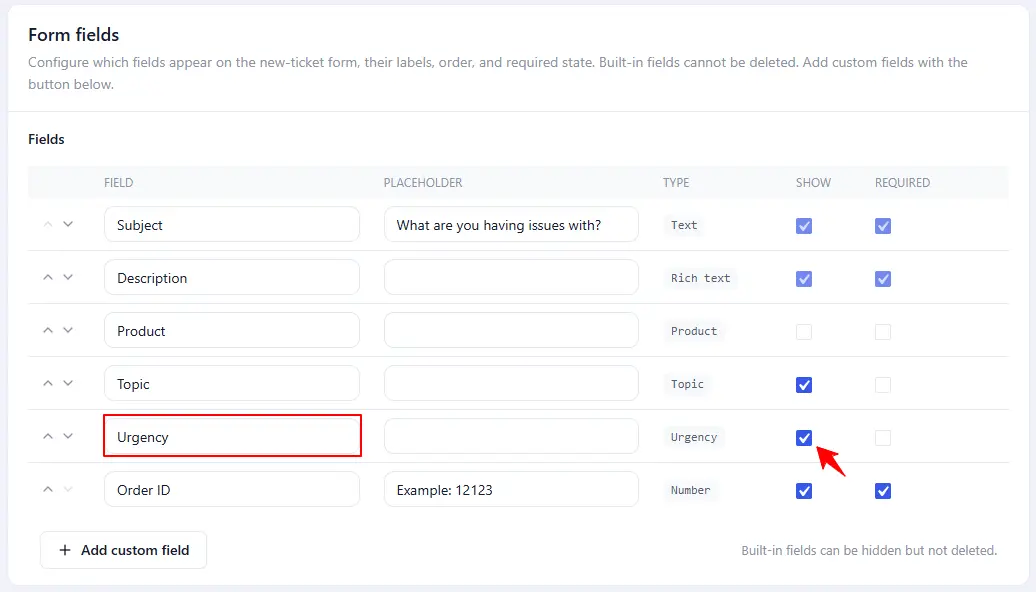
- Admin: the Urgency dropdown in the Ticket details box, which also offers — None —. An agent can override whatever the client chose.
Where the urgency shows up
- On the client’s ticket list and in the conversation.
- In notification emails, through the
##ticket_priority##placeholder. The “New ticket – to agent” email uses it by default. - In the information sent to the AI auto responder, so its answer can match the urgency.
It is not a column on the admin ticket list. NiroHelp adds only Client and Agent there, and there is no urgency filter or sort.
Working with urgency
Two patterns worth knowing:
- Alert someone on Severe only. Paging a person when a severe ticket arrives is a small piece of custom work – the recipe is in the Developers section.
- Add an urgency column to the ticket list. Also custom work, also small.
Why the levels are not editable
The four levels are referenced in the styling, in what is sent to the AI, and in what clients see. Adding a fifth means a code change and matching styles, so there is no setting for it today.
Was this doc helpful?