

NiroHelp has eight ticket statuses. They appear in the ordinary Publish box on the ticket editor. Two transitions happen automatically; the rest are
yours to make.
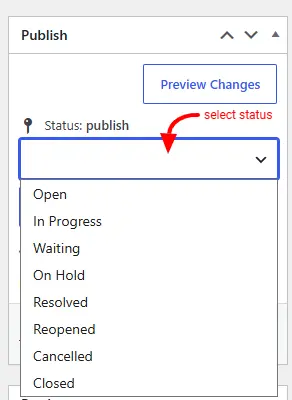
The eight statuses
| Status | Meaning |
|---|---|
| Open | Just submitted. Nobody has replied yet. |
| In Progress | An agent has replied. The ball is in the client’s court. |
| Waiting | The client has replied. The ball is in the agent’s court. |
| On Hold | Paused for an internal reason — waiting on a third party. |
| Resolved | An agent marked it resolved. |
| Reopened | For a ticket picked back up after being resolved. |
| Cancelled | Closed without a resolution. |
| Closed | Fully closed; no further action expected. |
The two automatic transitions
Both happen when someone posts a reply:
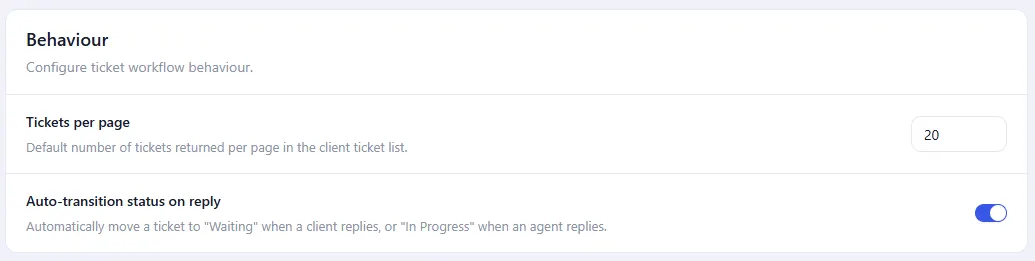
- Client replies → Waiting
- Agent replies → In Progress
The flip is skipped when:
- The ticket is already Resolved, Closed or Cancelled. Those are final: a client replying to a resolved ticket does not reopen it.
- Settings → Tickets → Behaviour → Auto-transition status on reply is unticked. That is the global off switch, and it is on by default.
What is never automatic
Nothing moves a ticket to Resolved, On Hold, Cancelled, Closed or Reopened.
Despite its name, Reopened is never applied by the plugin. A client replying to a resolved ticket leaves it resolved. An agent has to set Reopened by hand. All five are agent decisions, made in the Publish box.
The note in the conversation
Every status change the plugin sees adds a line to the conversation:
Ticket status changed from Resolved to Reopened by Jane Cooper
It is posted by Support Bot and names whoever was signed in, falling back to “Support Bot” for an automatic change with nobody signed in.
Two behaviours to expect from it:
- Moving a ticket to the trash adds nothing and emails nobody. Trash is not one of the eight statuses, so deleting a ticket never sends a “resolved” email.
- A bulk edit records one note, not one per ticket. The same is true of an importer. Do not rely on these notes as a complete audit trail.
Status-change emails
Only one status change sends an email: moving a ticket to Resolved mails the client. See Notification emails.
Was this doc helpful?