

The things people hit most often, and what to do about each. Most of them are
settings behaving as designed rather than faults.
Docs and addresses
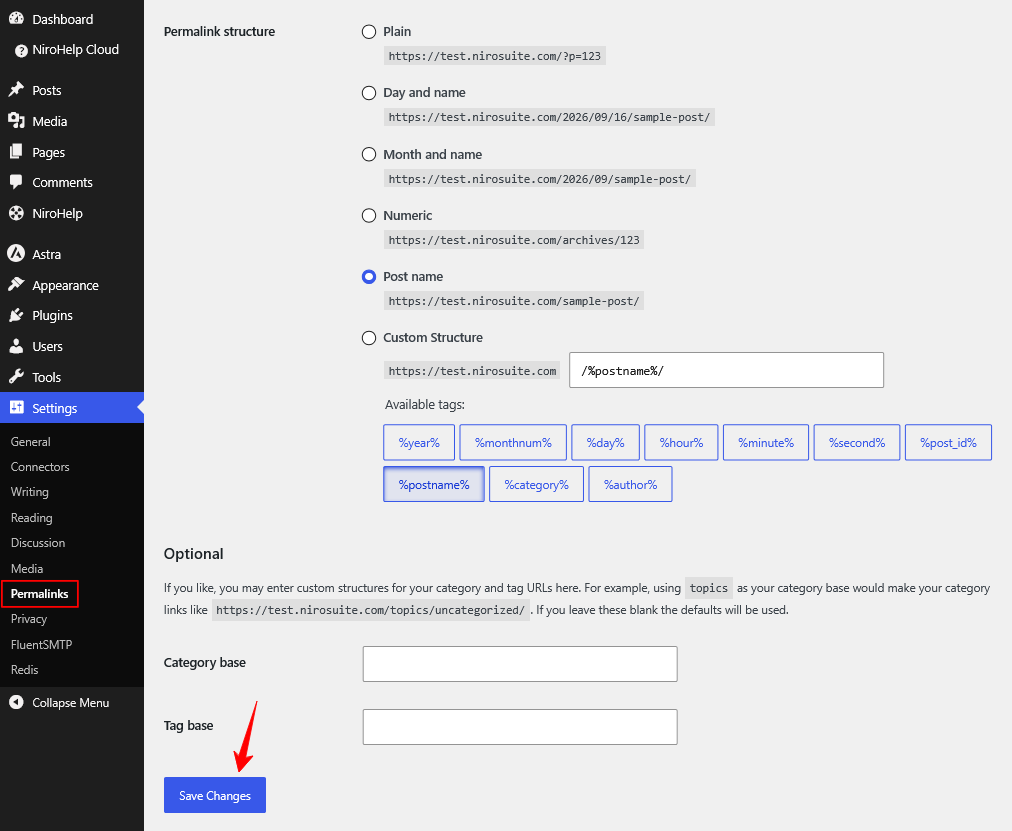
(i) Doc links suddenly return “page not found”.
You changed the URL structure and did not refresh your permalinks. Go to Settings → Permalinks and click Save Changes; you do not need to change
anything on that screen. See Doc URLs.
(ii) My whole knowledge base moved to a different address.
You renamed the slug of the page selected under Settings → Documentation → Pages → Docs archive page.
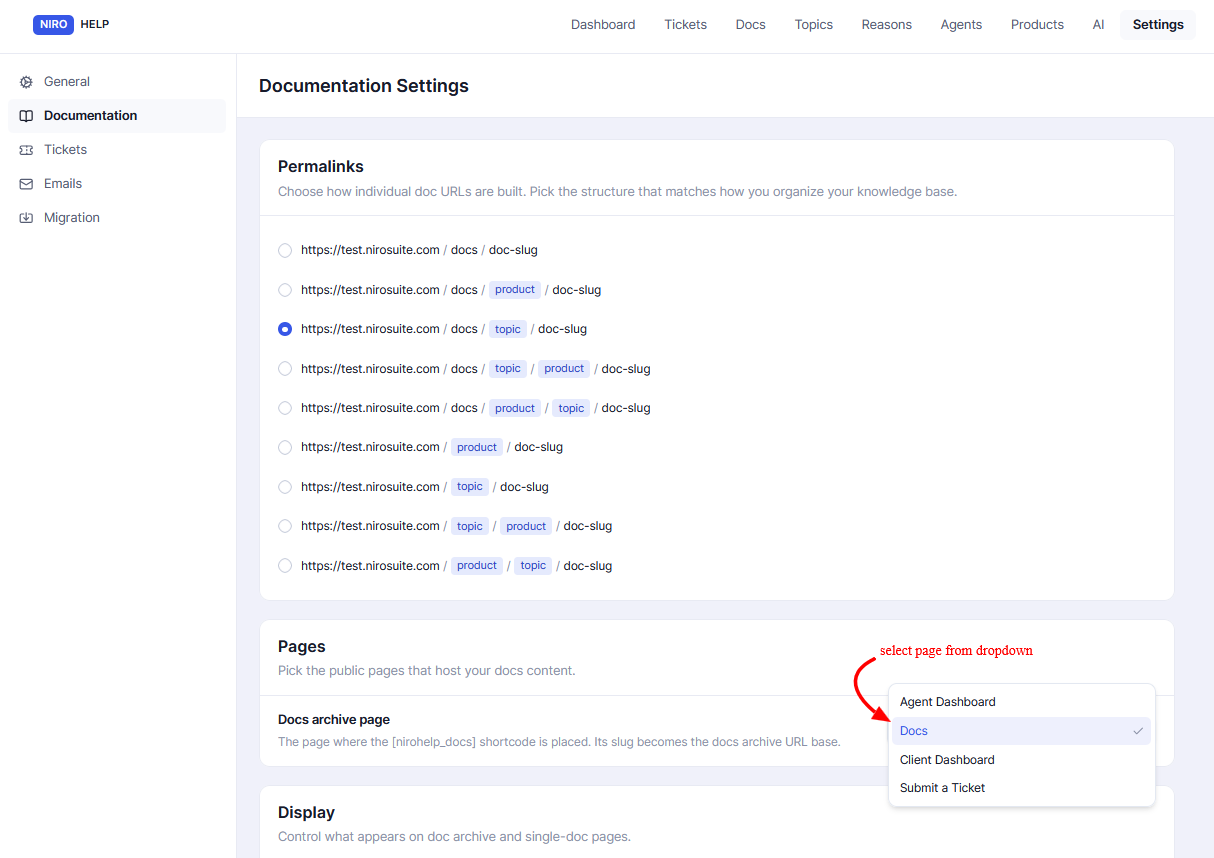
That page’s slug is the first part of every doc address. Rename it back, or refresh your permalinks and set up redirects.
(iii) A topic’s address opens a single doc instead of listing the topic.
Working as designed. There are no topic archive pages, opening a topic address sends the visitor to the first doc in it. The browsable listing is your docs archive page, which already groups by topic.
(iv) My docs archive looks out of date.
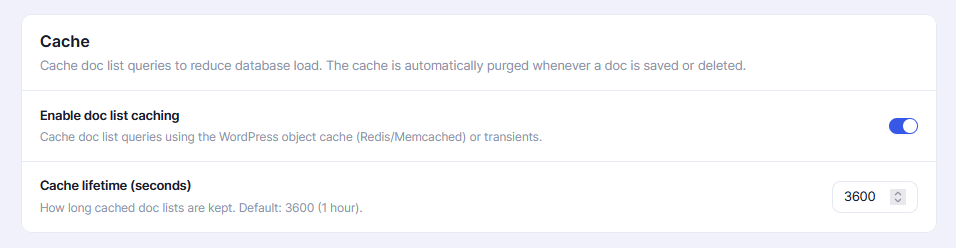
Doc lists are cached for an hour. Saving any doc refreshes the cache immediately. You can shorten or disable the cache under Settings → Documentation → Cache.
(v) Dragging rows only reordered part of the list.
Dragging reorders what is on screen. Raise the per-page count until the whole topic is visible, then rearrange.
(vi) My headings have no # links.
The doc was written in the block editor, whose headings are not recognised. Headings written in the classic editor get their links. See Code blocks and images.
(vii) My code block is not colour-highlighted.
The block editor’s own Code block has no language attached. Use the nirohelp_code shortcode with a lang attribute instead.
(viii) The same person keeps voting on a doc.
There is no duplicate-vote protection; reloading the page re-enables the buttons. Treat the counts as a rough signal, not a poll. See Reader voting.
Permissions
(i) My manager or agent sees no NiroHelp menu.
Known limitation. The NiroHelp roles cannot open the Docs, Tickets, Dashboard, AI, Settings, or Agents screens today, a manager sees only Topics, Reasons, and Products, and an agent sees nothing.
Give them an Editor or Administrator account, or have a developer add the missing capabilities to the role. See Roles and permissions.
(ii) A client cannot attach a file to their ticket.
Client uploads are switched off deliberately, and should stay off, the client role is handed to anyone who signs up from your public form.
Tickets
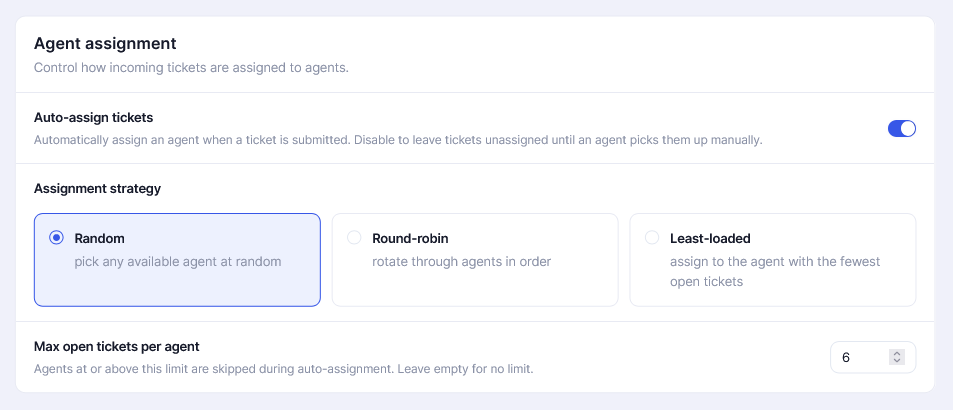
(i) New tickets are not being assigned to anyone.
Check three things, in this order:
Auto-assign tickets is ticked under Settings → Tickets → Agent assignment.
Your agents actually hold the NiroHelp Agent role. An administrator who answers tickets but does not carry that role is never picked.
Your Max open tickets per agent cap is not excluding everyone. The cap counts every ticket ever assigned, including resolved and closed ones, so a long-serving agent can be excluded with an empty queue. Leave it blank if in doubt. See Auto-assigning agents.
(ii) A client replied to a resolved ticket, and nothing happened.
Working as designed. Resolved, Closed, and Cancelled are final, a reply does not re-open them. An agent has to set the status by hand. See Ticket statuses.
(iii) There are no status, urgency, product or reason filters above the ticket list.
There are none to find. Use the search box, or the reason and product links. The only per-agent filter is the View tickets link on NiroHelp → Agents.
(iv) A custom ticket field does not appear on the ticket editor.
Custom fields are collected on the public form but are not shown in the ticket editor’s details box, which shows only agent, urgency, and order.
(v) The embeddable form on my other site ignores my form settings.
It has its own fixed field list and does not read the form-fields screen. Custom fields and switched-off built-ins do not reach it.
Logins and emails
(i) A client is told “No account found for this email address.”
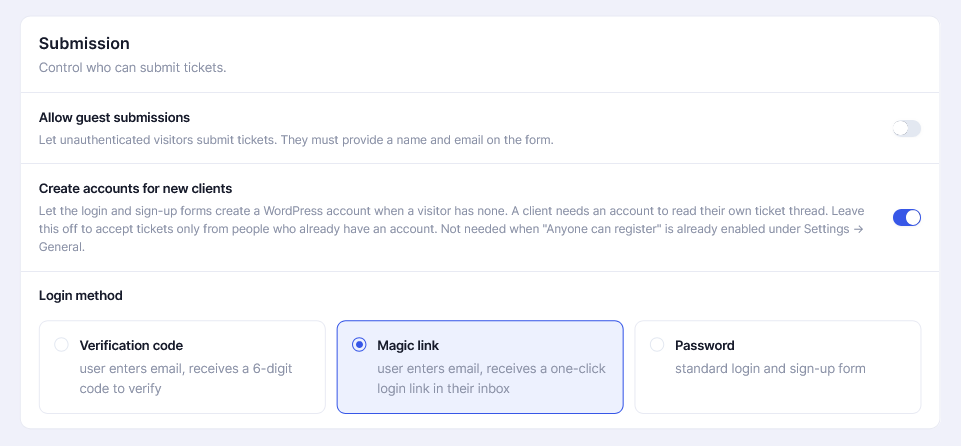
Account creation is not allowed, so no account was made and no code or link was sent. Tick Settings → Tickets → Submission → Create accounts for new clients, or turn on WordPress’s own Settings → General → Anyone can register. See Client login.
(ii) A login code is rejected.
Codes last 5 minutes and allow 5 attempts. After either limit, the code is discarded, and the client requests a new one.
(iii) Notification emails do not arrive, or land in spam.
NiroHelp sends through WordPress, which by default uses an address like wordpress@your-domain that many providers distrust. Install an SMTP plugin
WP Mail SMTP, FluentSMTP, or similar, and set your real sending address there. This is the single biggest fix for helpdesk email deliverability.
(iv) I blanked an email body and it still goes out.
Blanking a field does not stop the email, despite what the screen says, it sends an empty one. Stopping an email needs a developer or a mail plugin that
filters by subject. See Notification emails.
(v) Deleting a ticket did not send a “resolved” email.
Correct, and intentional. Moving a ticket to the trash triggers no email and adds no note.
AI features
(i) The chatbot answers with old information, or does not know about a new doc.
Click Sync Docs on NiroHelp → AI. Nothing syncs automatically. Make it the last step of every editorial pass. See Syncing docs to the AI.
(ii) The screen does not say when I last synced.
It cannot, no sync timestamp is recorded anywhere. The screen reports the sync you just ran and nothing else.
(iii) A chatbot on a customer’s site stopped working.
Its snippet carries a site key that is no longer valid, which happens after a Disconnect and re-registration. Copy the new snippet, or re-download and
reinstall the generated plugin. See Disconnecting and re-registering.
(iv) The chatbot does not appear on a page.
Check, in order: the snippet is before the closing </body> tag; your Show on / Hide on rules include that page, hide wins over show; and your Business hours with Offline mode set to Hide are not hiding the launcher at that moment. Hours are read in the visitor’s local time, not yours.
(v) “Collect lead” does nothing.
Correct. The setting is saved, but the widget ignores it today. Do not rely on it.
(vi) The auto responder never replies.
It stays quiet when the feature is off, the site is not connected, the ticket is Resolved / Closed / Cancelled, somebody already replied after the reply was
queued, or the AI’s confidence was below your threshold. See The AI auto responder.
(vii) The auto responder replies, but an agent always has to correct it.
Raise the Confidence threshold — 85 is a good next step. Longer instructions will not fix a confidence problem.
(viii) Instructions, Chatbot or Auto responder are missing from the AI menu.
The site is not connected. Register it first. Auto responder additionally needs the Support tickets module on. See
Registering for AI.
Dashboard
(i) A dashboard panel is empty.
An empty panel says so in words, “No topics exist yet.” Empty means no data, not a broken screen.
(ii) A panel shows an error instead.
Three screens do this today and it is expected: the AI usage meter and the two View logs screens on the Chatbot and Auto responder pages. They read data the AI service does not offer yet. This is on the service side and not something to fix on your site.
(iii)Today’s briefing is out of date.
It is written once a day, at 6am your site’s time, not when you open the page. The card shows when it was generated. Changing the date range also makes it fall back to plain figures rather than describing the wrong window.
Still stuck?
See Getting help.
Was this doc helpful?