

NiroHelp → AI → Instructions is a single box. What you write there is applied to every answer the AI produces for your site – chatbot replies and auto-responder replies alike.
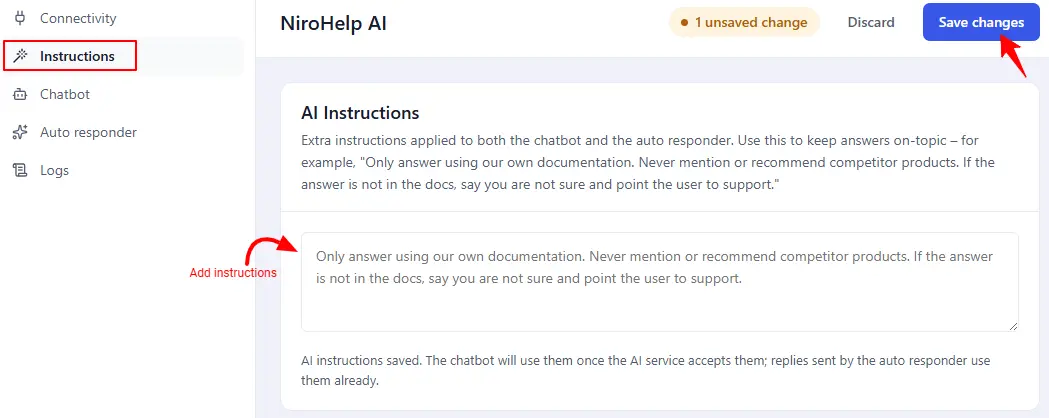
Use it for the rules the AI cannot work out from your docs: tone, what to refuse, and where to send someone your docs cannot help.
The grey text is an example, not a value
The box shows this in grey:
Only answer using our own documentation. Never mention or recommend
competitor products. If the answer is not in the docs, say you are not sure
and point the user to support.
That is placeholder text. An empty box stays empty and the service applies its own defaults. Nothing is saved until you type something.
Writing good instructions
Keep them short, concrete, and about behaviour rather than content – your docs are the content, and syncing is how you change that.
Worth stating:
- Scope. “Answer only from our documentation.”
- What to do when the docs do not cover it. Naming a fallback – a support email, your ticket form – is far more useful than “say you do not know”.
- Tone and length. “Two sentences, then the steps.”
- Hard refusals. Pricing negotiation, legal advice, competitor comparisons.
Not worth stating: facts. “Our refund window is 14 days” belongs in a doc, where it can be cited, found by search, and edited by whoever owns the policy.
What happens when you save
Your text is stored on your own site first, then pushed to the AI service.
If the push fails you will see either “Saved locally, but could not reach the AI service” or “Saved locally, but the AI service rejected the update”. Both mean what they say: your text is safe, and the service is still running the previous version. Save again once it is reachable.
Requires a connected site
There is nowhere to push the instructions to until the site is connected, which is why Instructions does not appear until then.
Instructions versus the confidence threshold
The two fix different failures:
- Instructions change how the AI answers when it has something to say.
- The auto responder’s confidence threshold decides whether it answers at all.
An assistant that is confidently wrong needs a higher threshold, not a longer prompt. See The AI auto responder.
For every way a ticket reaches a human, see What triggers a handoff.
Was this doc helpful?