

NiroHelp lets you choose how each doc’s web address is built. The setting is NiroHelp → Settings → Documentation → Permalinks, a list of nine structures.
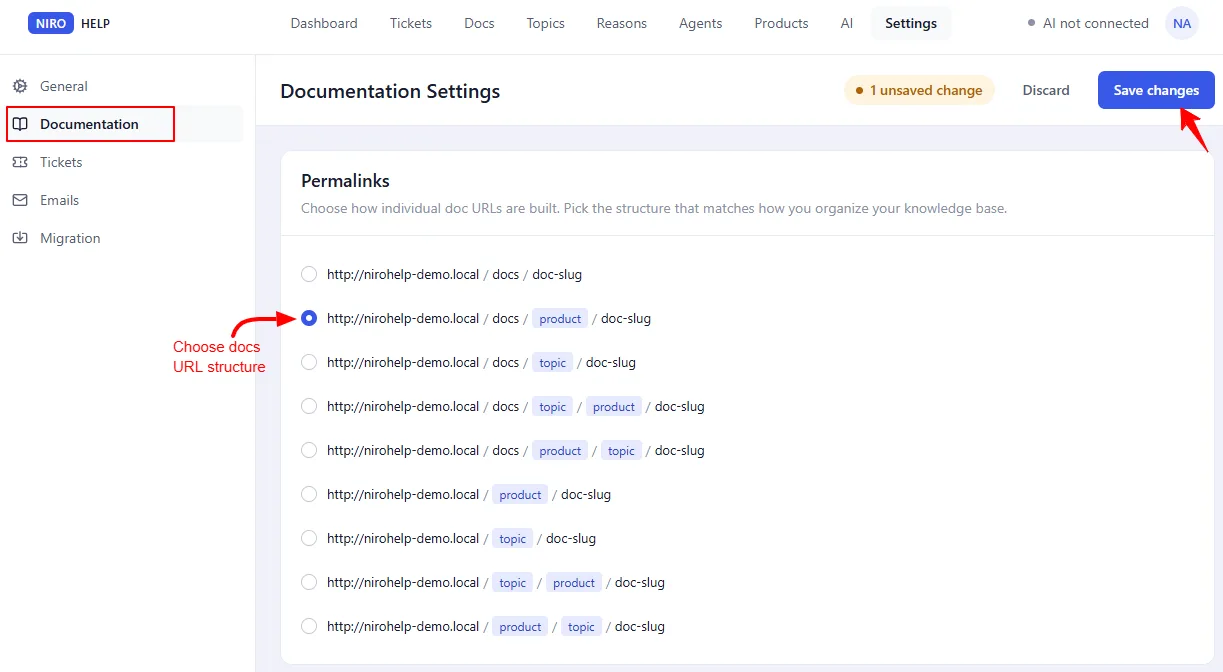
The first part of the address
The first part — usually docs, documentation or help — is the slug of the page you picked under Documentation → Pages → Docs archive page. It is not a setting of its own. If no page is selected, it falls back to docs.
Renaming that page’s slug therefore moves your entire knowledge base. Do it deliberately, and refresh your permalinks afterwards (see below).
With an archive page slugged docs, the five structures that keep it look like this:
| Structure | Resulting address |
|---|---|
| docs / doc | /docs/getting-started/ |
| docs / product / doc | /docs/nirohelp/getting-started/ |
| docs / topic / doc | /docs/setup/getting-started/ |
| docs / topic / product / doc | /docs/setup/nirohelp/getting-started/ |
| docs / product / topic / doc | /docs/nirohelp/setup/getting-started/ |
Four more drop it entirely, so the product or topic sits at the root of your site:
| Structure | Resulting address |
|---|---|
| product / doc | /nirohelp/getting-started/ |
| topic / doc | /setup/getting-started/ |
| topic / product / doc | /setup/nirohelp/getting-started/ |
| product / topic / doc | /nirohelp/setup/getting-started/ |
Picking the right one
- One product line? The plain
docs / docstructure is cleanest. - Several products on one site? Put the product first, so the address says what the article is about.
- Organized by topic — Setup, Billing, Integrations? Use a topic-based structure.
- Want the knowledge base to read as a normal section of the site? Use one of the root-level structures with no
docs/prefix.
After you change the setting
You have to refresh your permalinks yourself. Saving the NiroHelp setting is not enough — until you refresh, doc addresses built under the new structure return “page not found”.
Do one of these:
- Go to Settings → Permalinks and click Save Changes. You do not have to change anything on that screen; opening it and saving is the whole step.
- Or deactivate and reactivate NiroHelp.
Old addresses stop working
There is no automatic redirect from the previous structure. Before you change this on a live site, update any external links or set up redirects with a redirection plugin.
Topics and products are not archive pages
Nothing lists a topic on its own page. Opening a topic or product address sends the visitor to the first doc in that topic instead. The browsable listing is your docs archive page, which already groups by topic.
Was this doc helpful?